7 best budgeting apps for ADHD: These make money easier to track


You can have plenty of money in your account and still forget a bill is due tomorrow.
If you have ADHD, a useful budget should make upcoming payments and spending limits easy to see before you buy something. It also needs to be manageable on a week when you don't feel like reviewing every transaction.
This guide compares nine tools for tracking spending, planning ahead, and remembering money tasks. It also explains where two of the options, and Saner.AI, fit alongside a budgeting app rather than replacing one.
Saner.ai is included below. I work there, and I tested it like everything else
Quick guide: What are the best budgeting apps for ADHD?
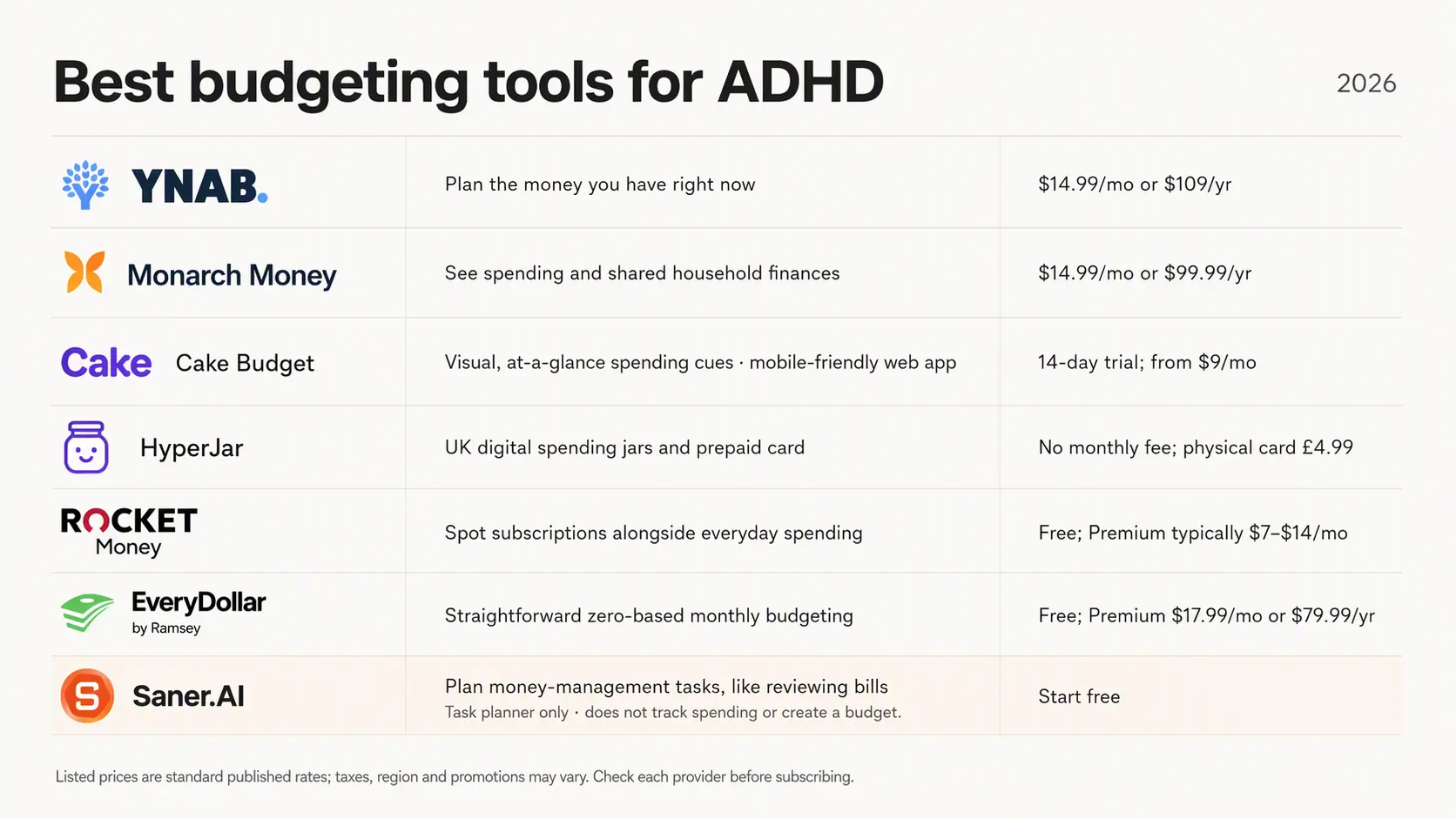
- You Need A Budget (YNAB): Best for people who want a detailed plan for the money they have right now.
- Monarch Money: Best for seeing spending and shared household finances in one place.
- Cake Budget: Best for visual, at-a-glance spending cues. It currently runs as a mobile-friendly web app.
- HyperJar: Best for UK users who want separate digital spending jars and a prepaid card.
- Rocket Money: Best for spotting recurring subscriptions alongside everyday spending.
- EveryDollar: Best for people who want a straightforward zero-based monthly budget.
- Saner.AI: Best for planning the tasks around money management, such as setting aside time to review bills. It does not track spending or create a budget.
How we chose these tools
We compared the tools' published features with common sticking points in ADHD money management: remembering bills, noticing repeat charges, checking what is safe to spend, and keeping up with transaction entry.
We also looked at how much setup and ongoing work each approach asks of you. Bank syncing may save time, but you'll need to check whether your accounts are supported.
Manual entry gives you more control, though it can become another task to remember. Country matters too: HyperJar is a UK product, while other options may have different bank connections and availability depending on where you live.
What are the best budgeting apps for ADHD?
Best budgeting apps for ADHD are: You Need A Budget (YNAB), Monarch Money, Cake Budget, Hyper Jar, Rocket Money, Every Dollar, and Saner.AI
Best budgeting apps for ADHD: comparison table
| Tool | Best feature for ADHD budgeting | Price | Device |
|---|---|---|---|
| You Need A Budget (YNAB) | Gives every dollar a job, so you can check what is available before spending. | $14.99/month or $109/year; 34-day trial | iOS, Android, web |
| Monarch Money | Shows connected accounts and spending in one dashboard. | $14.99/month or $99.99/year; 7-day trial | iOS, Android, web |
| Cake Budget | Uses green, yellow and red cues to show whether a purchase fits your budget. | From $9/month; 14-day trial | Web and mobile browser; installable web app |
| HyperJar | Separates money into digital jars you can spend from directly. | Free app; optional physical card costs £4.99 | iOS, Android; UK-focused |
| Rocket Money | Finds recurring subscriptions; Premium can help cancel unwanted ones. | Free plan; Premium typically $7–$14/month | iOS, Android; web budgeting requires Premium |
| EveryDollar | Provides a simple zero-based monthly plan; Premium adds bank syncing. | Free plan; Premium $17.99/month or $79.99/year | iOS, Android, web; mobile app and Premium are US-only |
| Saner.AI | Turns money-related notes and emails into tasks and reminders. | Free plan; Starter $8/month, Standard $16/month | Web and mobile app |
1) YNAB (You Need A Budget)
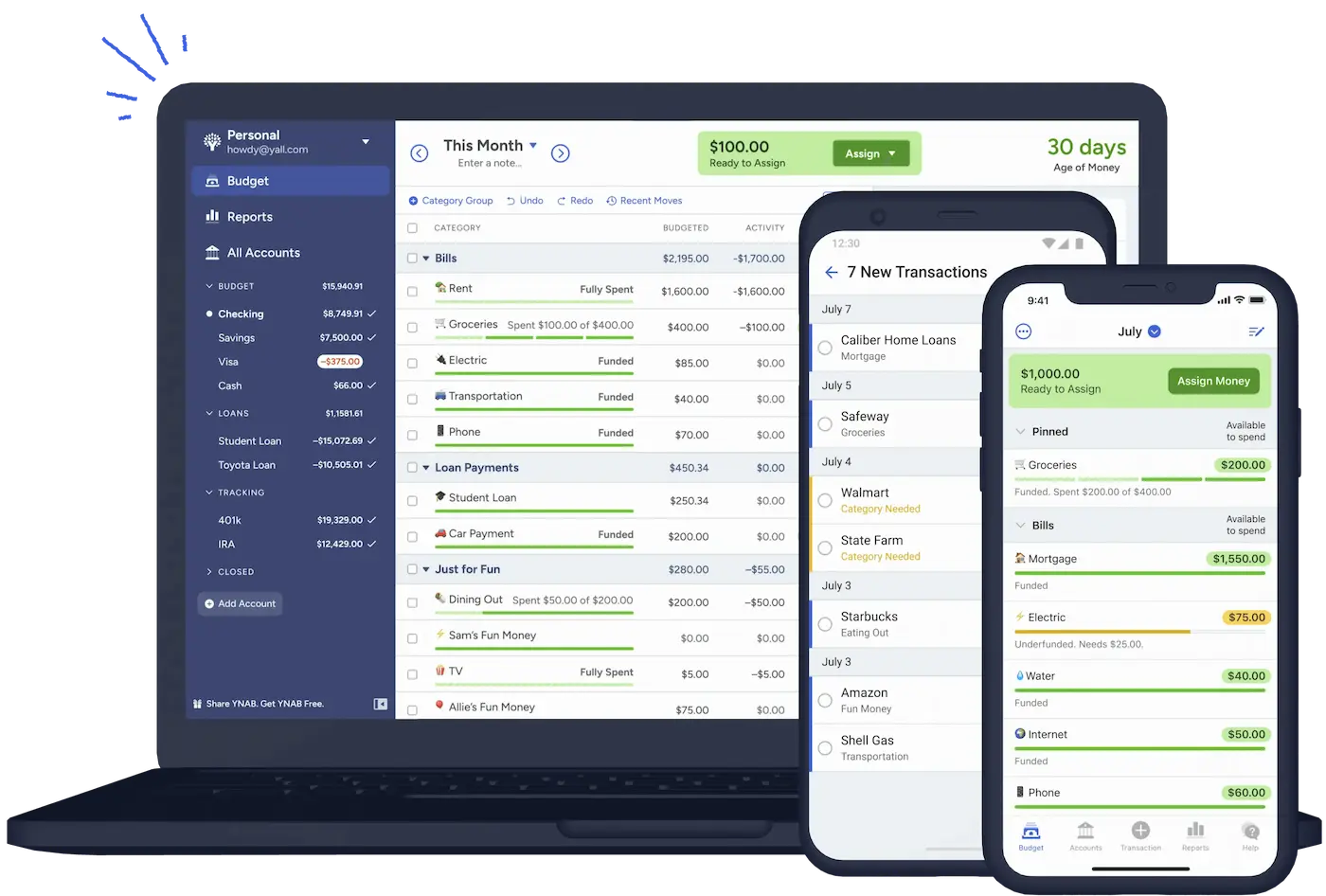
I'd include YNAB among the best budgeting apps for ADHD because it addresses a frustrating problem: having to mentally subtract upcoming bills every time you want to buy something. It does need regular attention, though
Where it helps
- Seeing what you can spend: You give each dollar a purpose, then check the relevant category before making a purchase.
- Adjusting a budget after an expensive week: I like that flexibility for anyone who feels defeated after overspending and stops opening their budget altogether. You can make an adjustment and keep going.
What might get frustrating
- Getting comfortable takes effort: YNAB asks you to learn its budgeting method as well as its interface. That upfront effort may be a real obstacle if you're already overwhelmed by money admin.
- You still have to return to it: Allocating money and keeping the budget accurate requires ongoing involvement. If you avoid it for a while, catching up can feel discouraging.
Cost and fit
- YNAB costs $109 a year or $14.99 a month, plus applicable tax. Its 34-day trial doesn't require a credit card when you sign up directly
2) Rocket Money
If manually logging purchases is where your budget usually falls apart, automatic spending tracking feature offered by Rocket Money gives you a more manageable starting point.
Where it helps
- Subscription tracking and cancellation help: Rocket Money brings recurring charges into view, and Premium includes assistance with canceling unwanted subscriptions.
- Automatic spending tracking: Linked transactions are categorized automatically, so you don't have to remember every purchase. You can see where your money went without reconstructing the week from receipts.
- Savings you can schedule: Premium lets you automate money going toward savings goals. If transferring money is something you repeatedly intend to do and then forget, taking that recurring task off your list could be a relief.
What might get frustrating
- Some of the useful automation costs extra: Subscription cancellation assistance and automated savings require Premium.
- You still have to respond to what it shows you: Automatic tracking can make spending more visible, but you'll need to review the information and act on it.
Who I'd recommend it to
- Someone with ADHD whose biggest budgeting obstacles are forgotten charges and the effort of keeping records updated.
3) EveryDollar
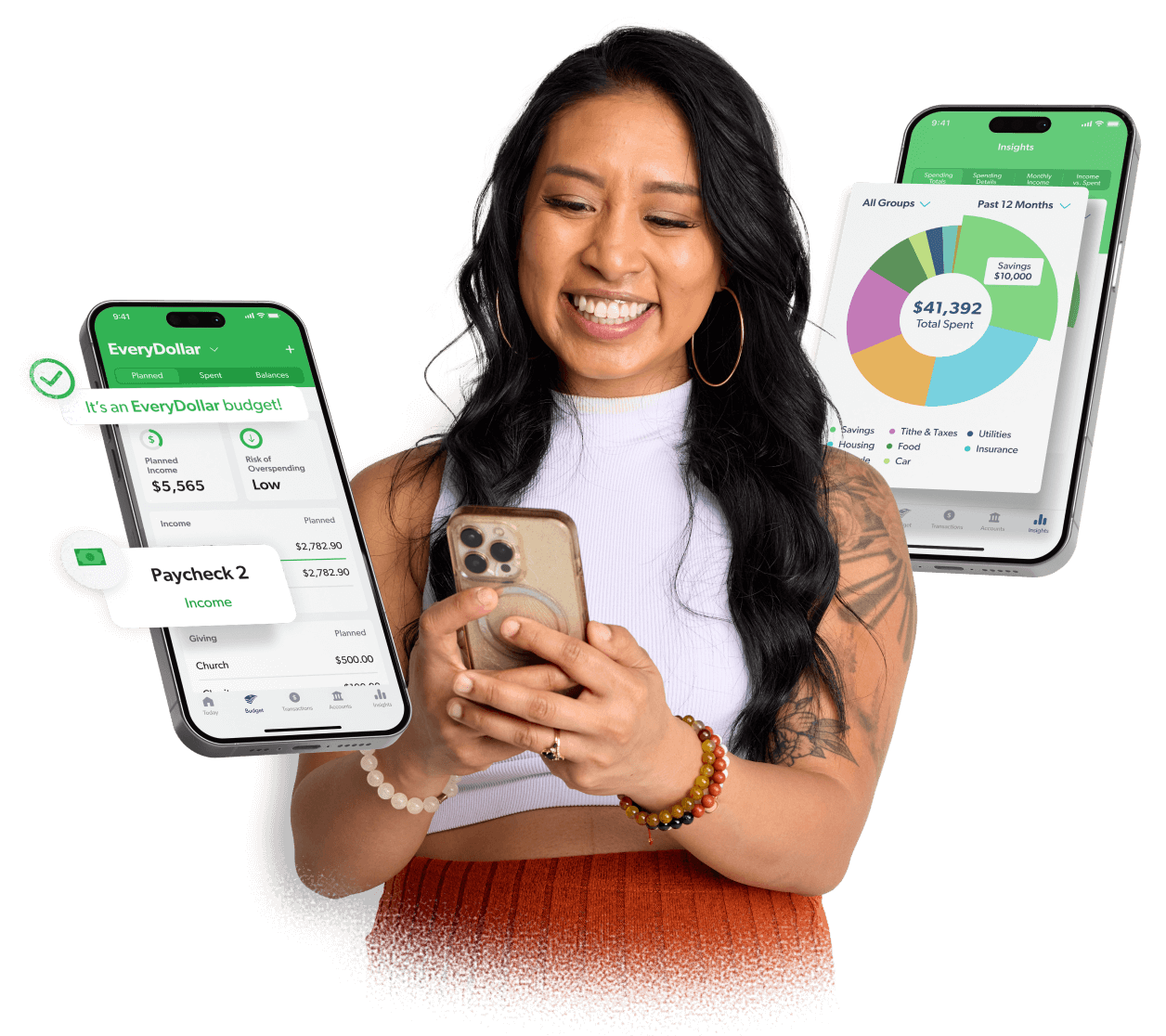
Checking your bank balance and thinking "I can afford that" gets stressful when you've forgotten about a bill due tomorrow. EveryDollar helps by giving each dollar a job before you spend it, so you can see what's left in your grocery budget without doing the maths in your head.
Where it helps
- A straightforward budget you can customize: You can create categories that match your actual spending, including a realistic takeaway allowance.
- Automatic transaction imports with Premium: Connected bank transactions come into the app, reducing the need to remember every purchase immediately.
- Split transactions for mixed shopping trips: You can divide one receipt between categories.
- A free version you can try without a deadline: The core monthly budget and manual tracking are free indefinitely.
Where it can get frustrating
- Free budgeting still means manual entry: Remembering to log purchases can become another unfinished task. If that's already your biggest budgeting headache, the free plan may ask too much of you. Bank imports require Premium
- Bank connections aren't guaranteed to stay trouble-free: Test your bank during the trial before committing.
Who I'd recommend it to
- Someone with ADHD who wants clear spending categories and can manage brief, regular budget check-ins.
- Premium is worth considering if forgotten transaction entry is the sticking point.
4) Monarch Money
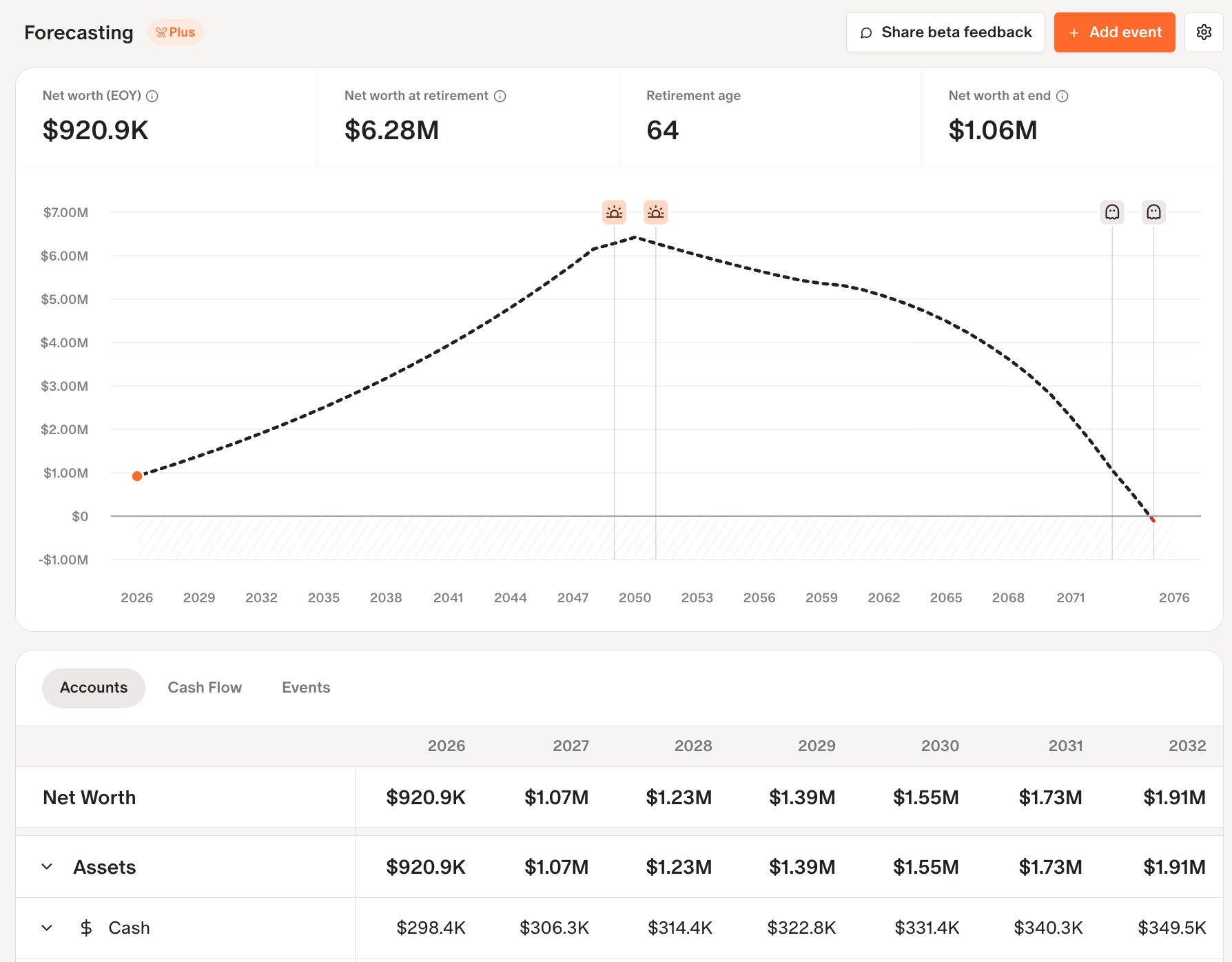
Monarch brings those accounts into one dashboard and imports transactions automatically. I'd include it among the best budgeting apps for ADHD because it reduces the effort of getting an accurate picture of your money, especially when you've been putting off looking.
Where it helps
- Less manual tracking: Monarch syncs connected accounts, so forgetting to log purchases doesn't automatically leave you with an outdated budget.
- A clearer view of your spending: Customizable reports let you focus on the information you actually need.
- Recurring charges are easier to notice: Monarch displays recurring expenses, giving you somewhere to check for that subscription you genuinely meant to cancel.
- Shared budgeting without sharing a login: You and a partner can work from the same financial picture.
What could get frustrating
- Limited ways to reach support: Help is available through email and online requests, but you can't call someone to work through the problem.
Who I'd recommend it to
- Someone with ADHD whose biggest budgeting hurdle is keeping scattered financial information up to date, especially if they manage money with a partner.
- It's worth considering if automatic tracking would make checking your finances feel manageable enough to do regularly.
5) Cake Budget
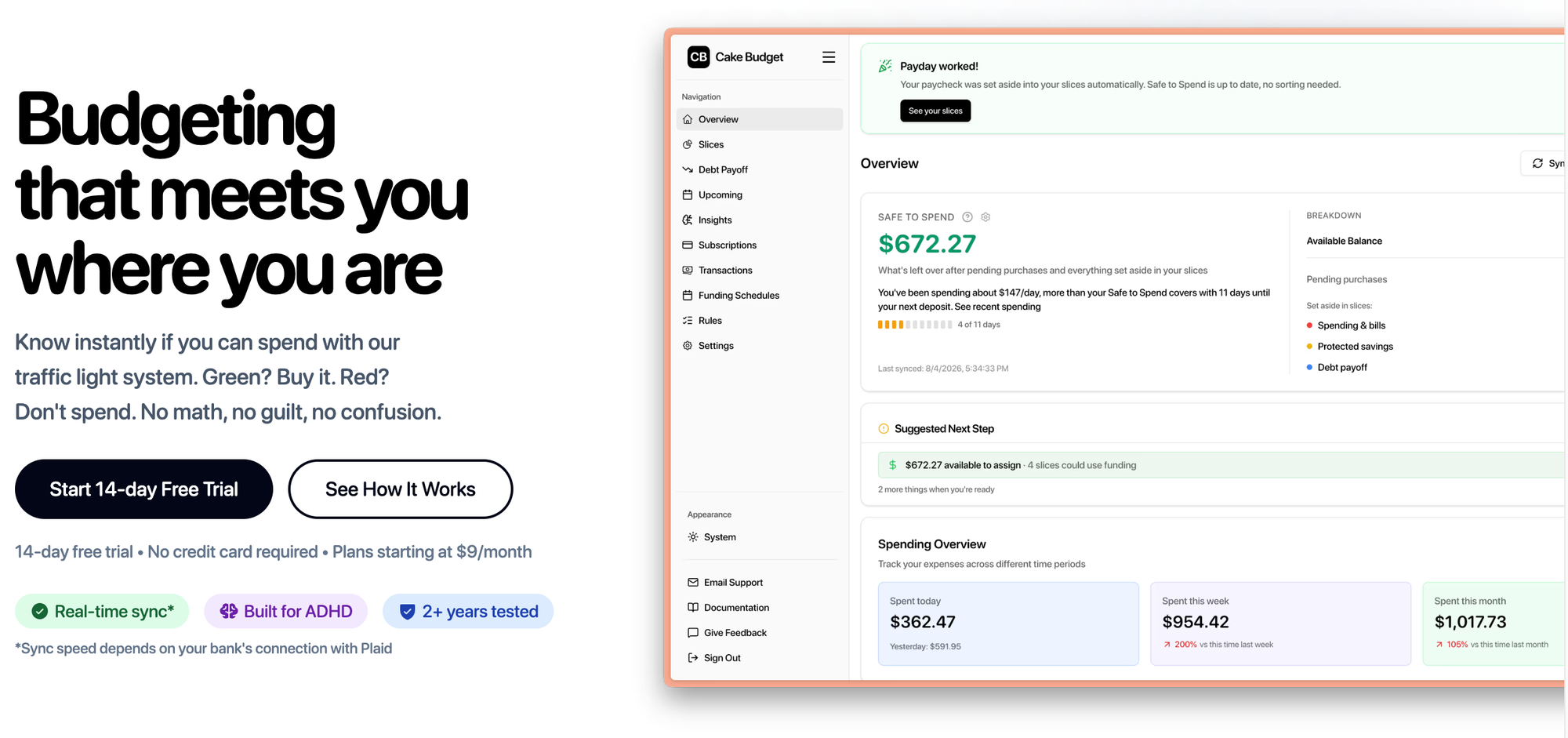
That anxious "wait, can I actually afford this?" moment is where Cake Budget looks useful. It combines virtual envelope budgeting with a color-coded spending guide and automatic transaction sorting. I'd consider it for a list of the best budgeting apps for ADHD because it addresses a frustrating problem: keeping a budget going after the initial excitement of setting one up wears off.
Where it could make budgeting easier
- A quick spending check: Cake's traffic light changes color based on your Safe-to-Spend balance, with thresholds you can customize, which gives you a visual cue when you're standing at checkout
- Less transaction cleanup: Cake says its rules automatically categorize transactions while connected bank accounts bring in spending data.
- Paychecks get assigned automatically: Funding schedules divide incoming paychecks among "slices," Cake's name for virtual budget envelopes.
- Easy access from your phone: You can check your spending allowance while you're out, then use a larger screen for planning at home.
What I'd check before committing
- Updates aren't guaranteed to be instant: Cake acknowledges that bank-sync speed varies. Some connections can take hours, and its alternative SimpleFIN connection syncs daily. A green light still needs a little caution if a recent purchase hasn't appeared yet.
- Keeping the automation costs money: I'd use the trial to check your bank connection and see whether the spending cues actually help before taking on another recurring expense.
Who I'd suggest it to
- Someone with ADHD who finds manual budget maintenance exhausting and wants a quick spending check before making a purchase.
6) HyperJar
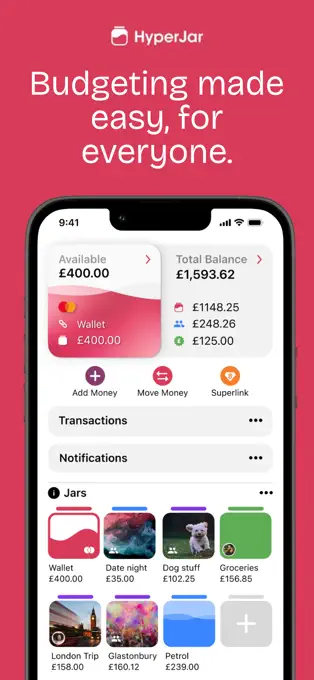
Seeing £400 in your account can feel reassuring until you remember how much of it already has a job. That anxious "what can I actually spend?" calculation is why I'd consider HyperJar for a list of the best budgeting apps for ADHD.
Where it helps
- Separate pots make spending money easier to see. Give each jar a name and colour so you can check what's left for a particular expense. I'd start with a few broad categories
- You can spend from the budget you've set. Linking your card to a jar means purchases come out of that pot.
- Shared jars simplify household spending. A grocery jar could save some of the frustration of remembering who paid last and which transfers you still owe.
- A misplaced card can be frozen in the app. Having a way to pause it while you search is genuinely useful when the alternative is panicking and cancelling a card that's probably inside yesterday's jacket.
What could get frustrating
- There are fees worth remembering. No monthly subscription doesn't mean every action is free. Physical cards cost £4.99, and loading or transferring money outside the free allowances can incur charges.
- It won't replace your everyday bank account. HyperJar doesn't support direct debits, so you'll still need another account for those bills. It also lacks ATM withdrawals.
- HyperJar requires a UK address and bank account. Money is safeguarded under e-money rules, but it isn't covered by FSCS deposit protection. See HyperJar's account information.
Who I'd recommend it to
- UK users whose biggest budgeting headache is knowing how much is available to spend today.
- HyperJar's visual jars could be helpful if ADHD makes mental bookkeeping difficult, provided you're comfortable allocating the money and keeping a separate account for bills.
7) Saner.AI
Finding another subscription charge after you meant to cancel it is frustrating. Especially when you remember thinking, "I'll deal with that tonight."
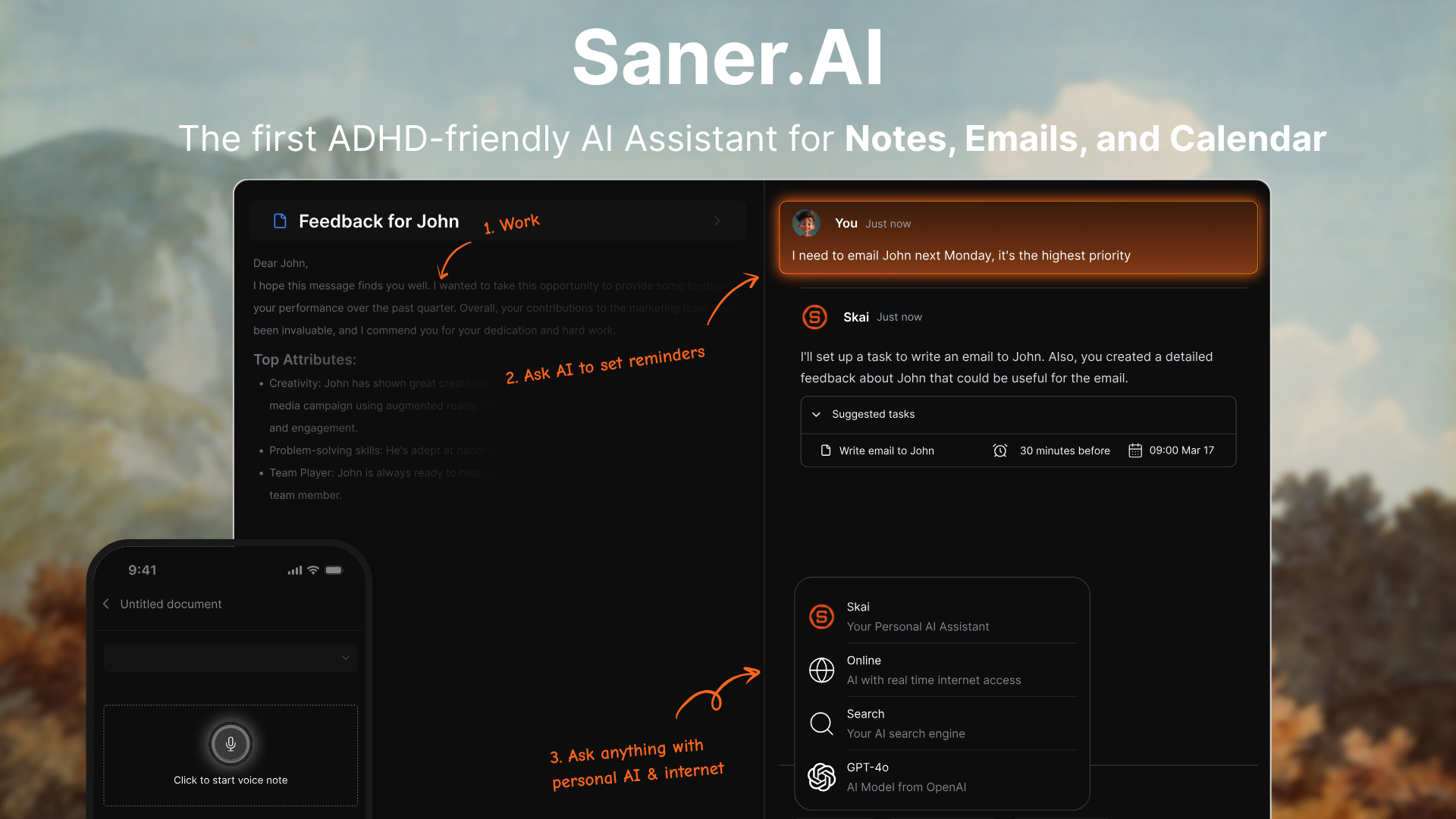
Saner.AI deserves a supporting spot in a guide to the best budgeting apps for ADHD. It's an AI personal assistant, so you'd use it alongside your budgeting app. It can turn a messy brain dump into tasks and help you fit financial admin into your day.
Where it helps
- Capturing details while you're browsing: The Chrome extension lets you take notes alongside a webpage. When you're comparing insurance quotes or checking a subscription's cancellation terms, you can record the important details without leaving the page and getting sidetracked.
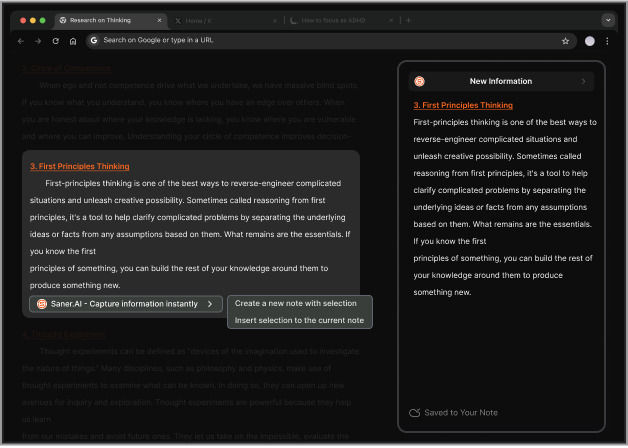
- Finding financial notes without remembering their exact wording: Its AI assistant, Skai, answers questions using information you've saved. A practical use would be asking, "What did I write down about cancelling my gym membership?" That could save you from hunting through old notes
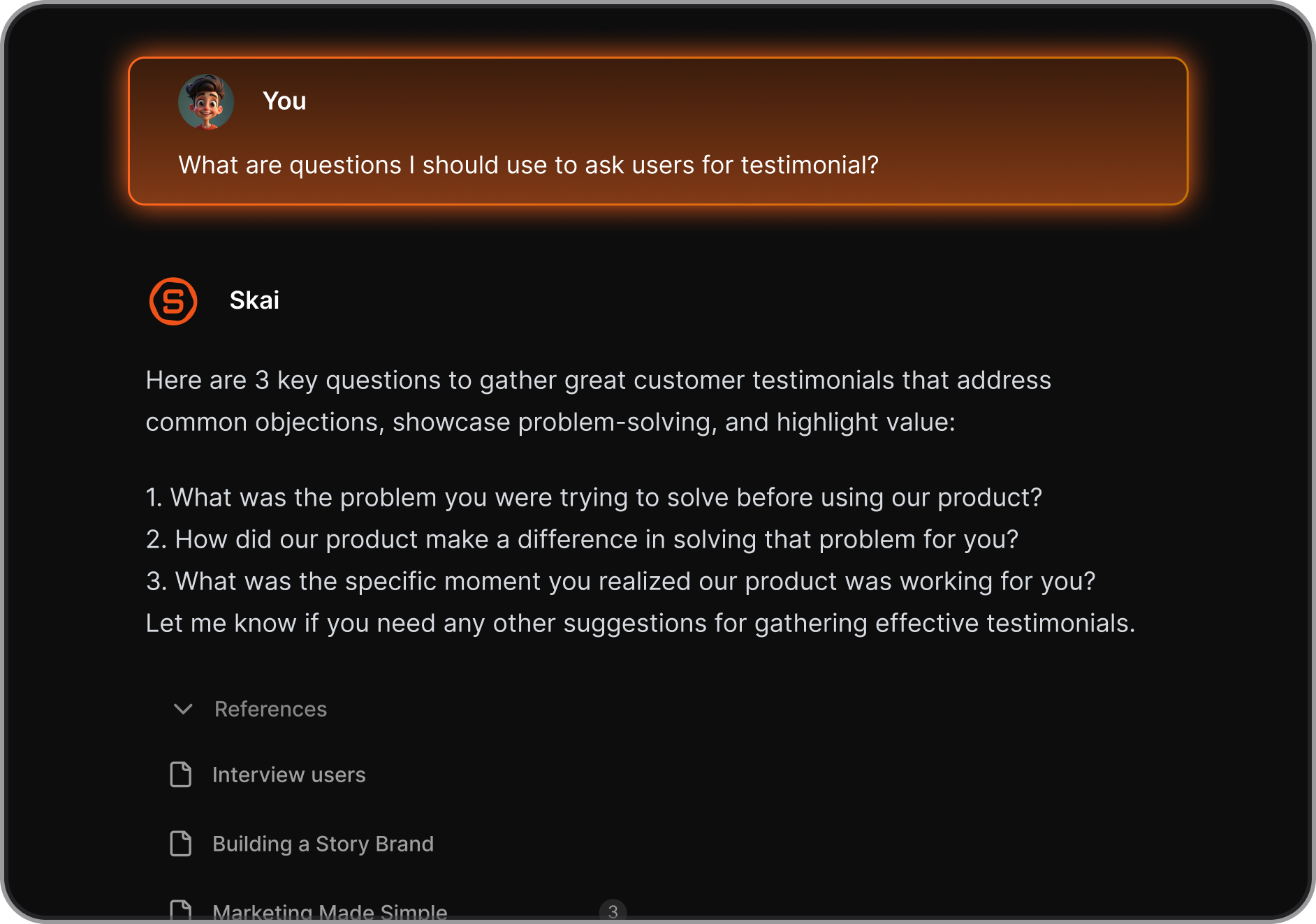
- Task organization when money admin feels overwhelming: Write down "cancel the trial before Friday" or "check whether that refund arrived." Saner supports turning brain dumps into plans, giving those loose intentions somewhere to go.
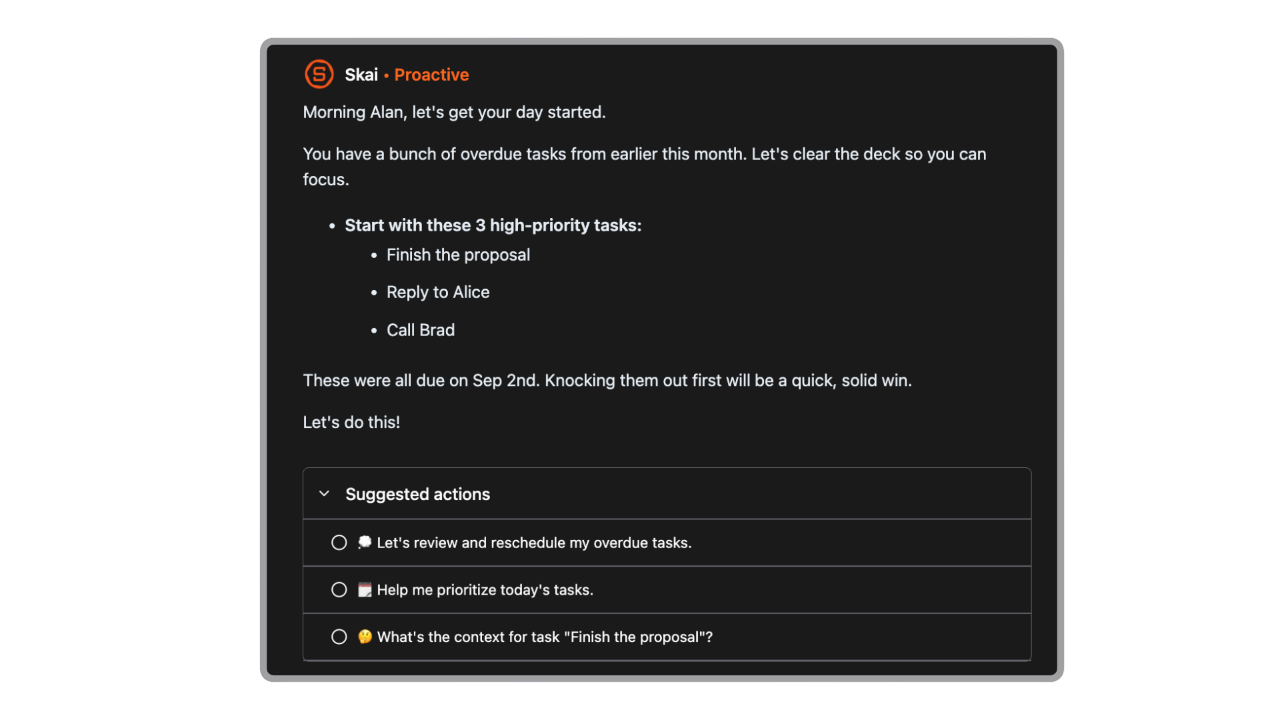
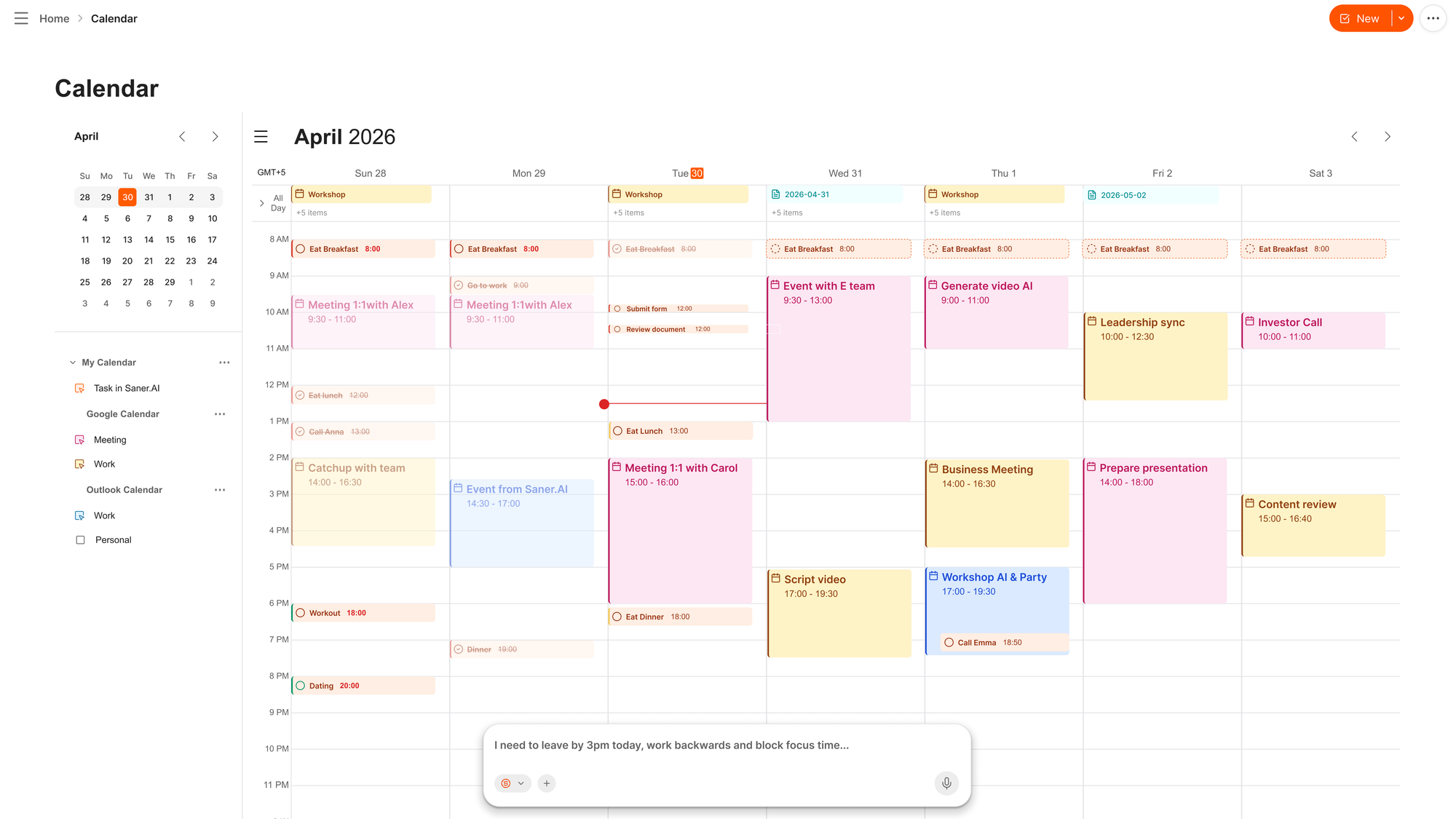
- AI chatbot built into your calendar: you can add, remove, or even request it to remind you the day of your subscription
What to keep in mind
- You'll still need a dedicated budgeting tool: Saner's documented focus is managing information and tasks. Don't choose it expecting bank syncing, automatic spending categories, or a live picture of what you can afford.
- Important dates need a double-check:
Who I'd recommend it to
- Someone who already has a budget but keeps putting off the small jobs around it. If forgotten cancellations and unfinished refund requests are the painful part, Saner.AI could be a useful companion.
Conclusion:
The best budgeting app for ADHD is the one that makes your next money decision easier.
Pay attention to the work each app asks of you. A detailed budget can be helpful, but it still needs regular attention. If manual tracking tends to fall away after a busy week, choose a tool that reduces how much you have to enter yourself.
Budgeting also involves tasks outside the app: checking a bill, reviewing a subscription, or sitting down to plan next month. Saner.AI can help you make room for those tasks in your day and remember to follow through. Pair it with a budgeting app to keep the money itself in view.

Stay on top of your work and life effortlessly
FAQ
What is the best budgeting app for ADHD?
It depends on where you get stuck. YNAB is a strong choice for planning spending in detail, while Cake Budget gives you a quick visual cue when you're deciding whether to buy something. If subscriptions are the problem, start with Rocket Money. The best option is one you'll be willing to open when your budget needs adjusting.
What features should I look for in an ADHD-friendly budgeting app?
Look for a clear view of what's available to spend and how much work it takes to keep that number accurate. Bill reminders, automatic transaction imports, and simple spending categories may help, depending on what you tend to forget or avoid. Check that the app connects to your bank before you commit to a paid plan.
Can a budgeting app help with impulse spending?
It can give you a useful pause before a purchase. Cake Budget shows a visual spending status, YNAB lets you check the amount available in a category, and HyperJar lets you separate money into spending jars. You'll still need to look at the app in the moment, so choose a system that makes that check quick.
Is there a free budgeting app for ADHD?
Some apps on this list offer free access or a free tier, though the features vary. EveryDollar has a free version with manual transaction tracking, and Rocket Money offers free budgeting and subscription-tracking features. HyperJar has no monthly fee for its money-management app and prepaid card.
Is Saner.AI a budgeting app?
Saner.AI is a productivity app for planning your day, organizing tasks, and setting reminders. It doesn't track your transactions or tell you how much you have left to spend. If remembering to review your budget is the hard part, you could use Saner.AI to plan that check-in and use a budgeting app for the numbers.
Stay on top of your work and life effortlessly