We Tested 12 Lindy AI Alternatives. Here are the best 6


Lindy stopped being an agent builder and became a $49.99/month text-message executive assistant; the free plan disappeared, and the published credit numbers disappeared with it
This is for you if you tried Lindy and bounced off the meter. It's also for you if you're about to subscribe and want to know what you're actually buying, because what Lindy sells today is not what most articles are still describing.
Quick answer: What are the best Lindy alternatives in 2026?
- Saner.AI — Best overall Lindy alternative for knowledge workers and people with ADHD. It pulls tasks out of your notes, emails, and documents into one workspace instead of just texting you about them.
- Poke — Best if you specifically wanted the text-message assistant. Same iMessage/SMS/WhatsApp interface as Lindy, genuinely free tier, and Pro is $19/month instead of $49.99. N
- ChatGPT — Best all-purpose replacement. Agent Mode, Tasks, Deep Research, and Projects cover most of what Lindy's assistant does, plus everything else. Free, or $20/month on Plus.
- Claude — Best for careful work on long documents, and for anyone who wants an agent that runs on their own files. Free, $20/month on Pro, $100 or $200 on Max.
- Gemini — Best if you live in Gmail and Google Calendar. AI Inbox and Daily Brief do triage where your mail already sits. Free, or $19.99/month on Google AI Pro.
- OpenClaw — Best free and self-hosted option, and the only one on this list you fully own. Open source under MIT, runs on your own machine, and connects to WhatsApp, Telegram, Discord, and Slack. Also the riskiest thing here by a wide margin.
What is an AI executive assistant?
An AI executive assistant is software that connects to your email, calendar, and apps, then acts on them without you asking each time. It triages your inbox, drafts replies in your voice, schedules meetings, takes meeting notes, and pings you when something needs a decision. That's the category Lindy, Poke, and Saner.AI all sit in.
How I chose these six
I started from Lindy's actual 2026 job description, not its old one: inbox triage, reply drafting, meeting scheduling, meeting notes, proactive reminders, and long-term memory of how you work. Then I looked for tools that do at least three of those six well, connected each to a live Gmail account and calendar, and ran them across a normal working month. Pricing was verified against each vendor's own page, not aggregators. Where I quote users, I'm quoting public reviews on Trustpilot, G2, Capterra, Product Hunt, and Reddit, not testimonials from vendor sites.
- Proactivity — Does it start conversations, or wait to be opened? This is the single biggest split in the category and the one most comparison posts ignore.
- Memory that survives the thread — Can it recall a decision from three weeks ago without you re-explaining? Notification is cheap. Retrieval is the hard part.
- Cost predictability — Can you know what a month costs before the month happens? Credit meters that only reveal a price after execution fail this test regardless of headline price.
- Inbox and calendar depth — Read-only summarizing is easy. Drafting in your voice, negotiating times, and handling reschedules is where tools separate.
- Where it lives — Text thread, browser, desktop app, or your own hardware. This determines whether you actually use it on a bad day.
- Exit cost — If you cancel, do you keep anything? Export, self-hosting, and data portability matter more than anyone admits until they're leaving.
What Are The Best Lindy AI Alternatives?
The best Lindy AI Alternatives are: Saner.AI, Openclaw, Claude, chatGPT, Gemini, Poke
1. Saner.AI - No-setup AI assistant
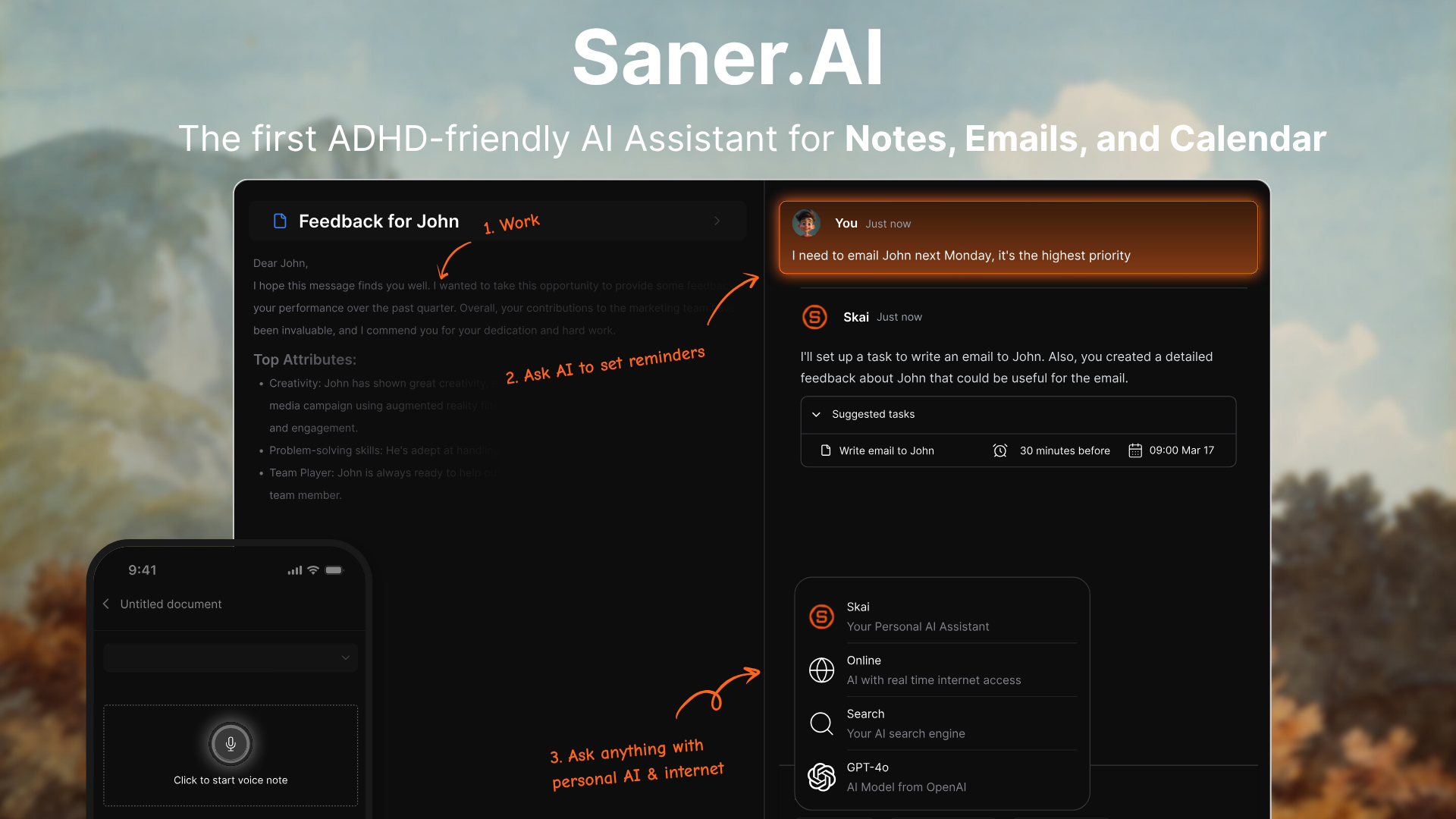
Saner.AI connects Gmail, Google Calendar, Drive, and Slack, pulls action items out of the mess, and gives you one workspace where notes, tasks, email, and calendar sit together. The AI assistant is called Skai. It was built by a team that includes ADHDers, and that shows up in small decisions everywhere.
Key features
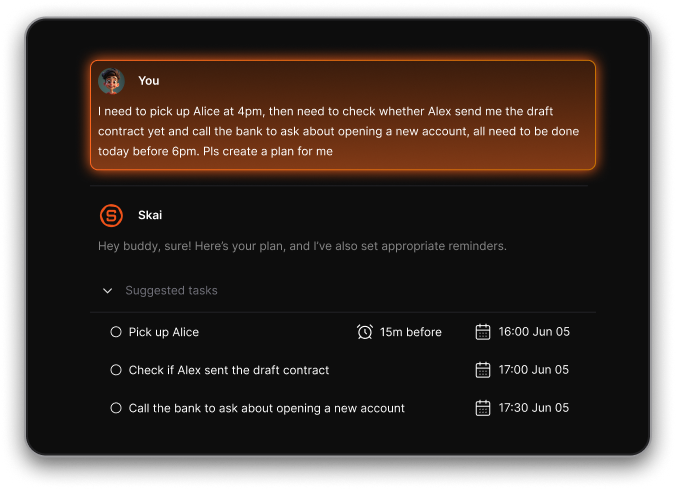
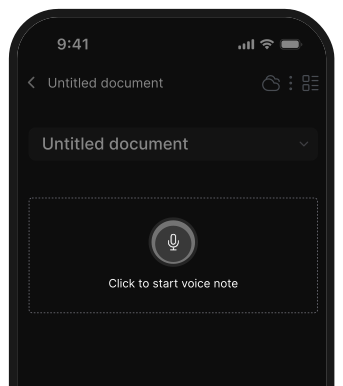
- Task extraction from unstructured input. Dump a voice note, a meeting scribble, or a client email, and it pulls out the actual next actions without you tagging anything.
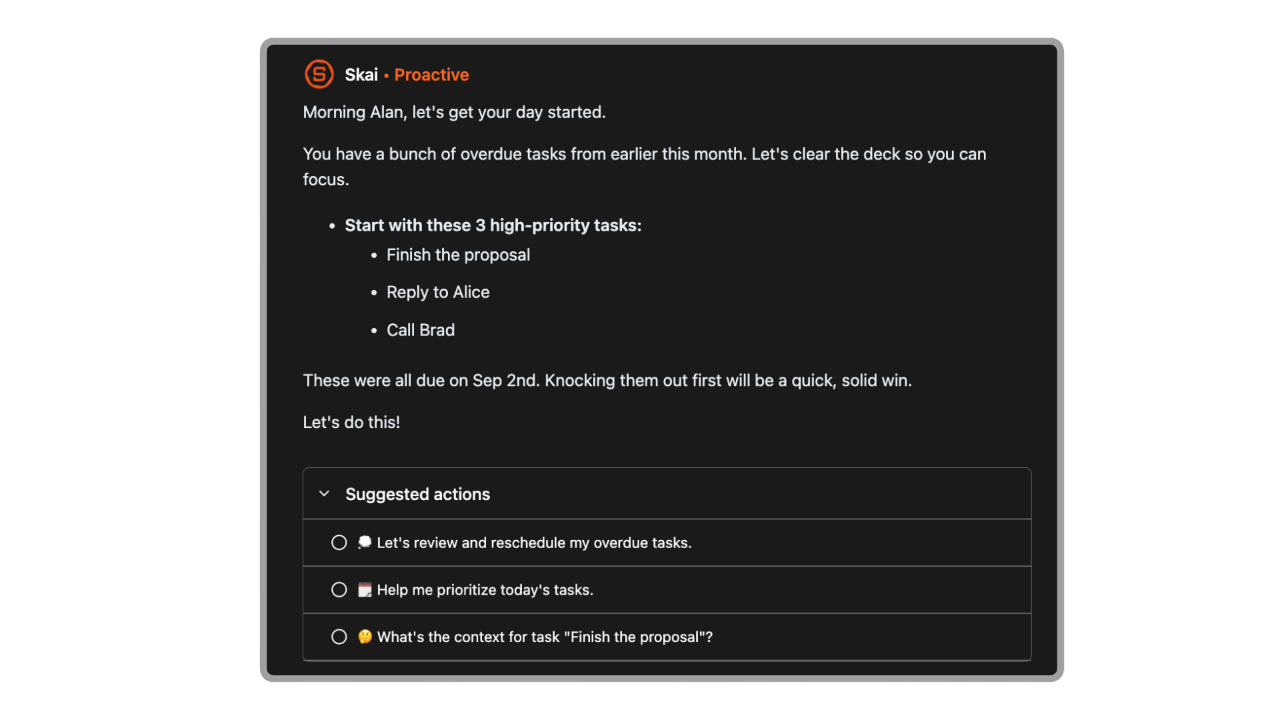
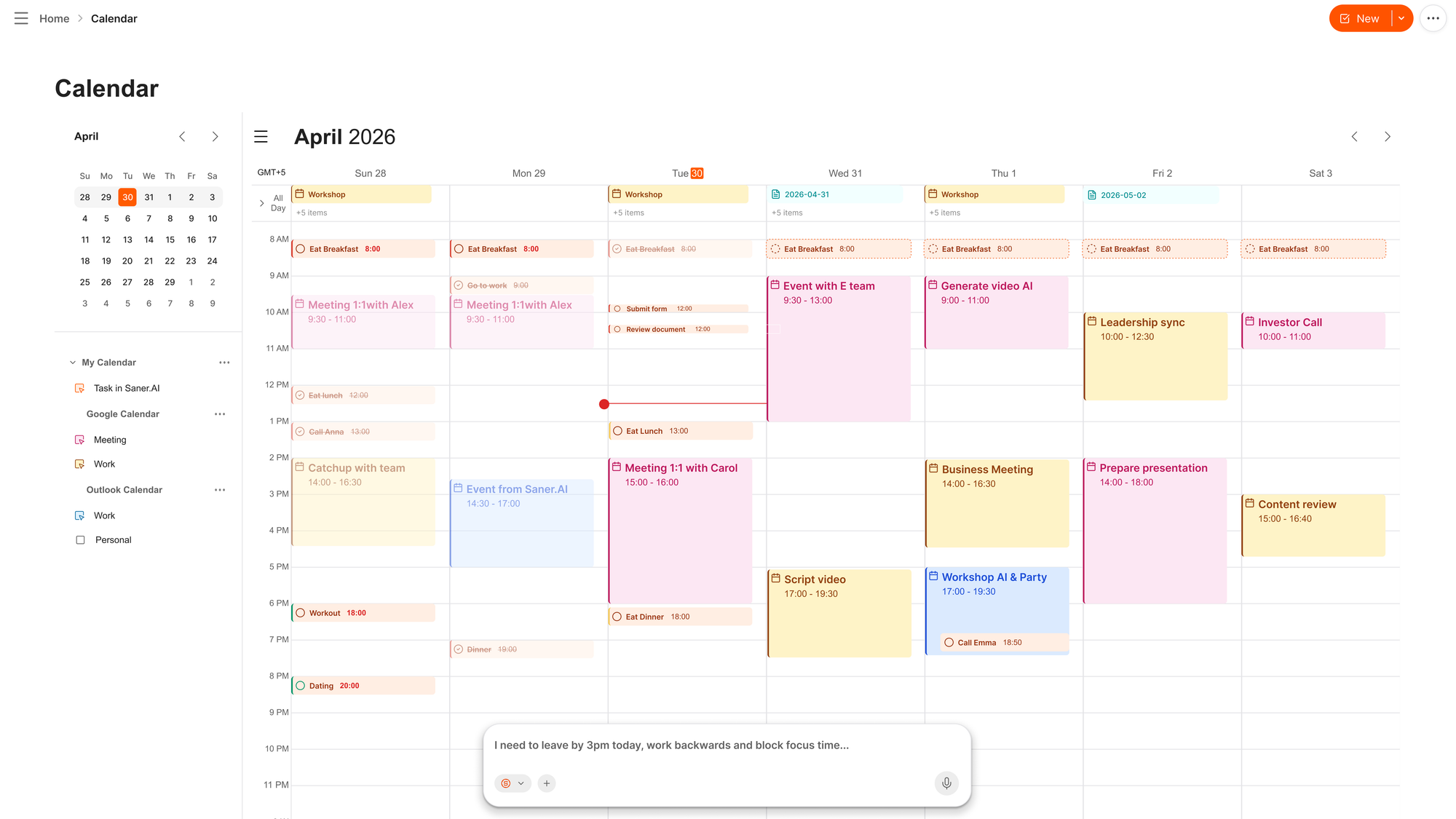
- Proactive daily planning. It builds a prioritized morning view and re-shuffles as your day slips.
- Semantic search across everything you've captured. Ask a question in plain English, and it answers from your own notes, emails, and files.
- AI calendar for your day
Pros
- I stopped losing things between apps. Capture on Chrome, act on mobile, and it's the same workspace.
- The morning brief actually changes my behaviour. It's the only tool here that tells me what to do, not just what happened.
- At $8/month billed annually, it's the cheapest proactive assistant on this list by a distance.
Cons
- The note editor is thin compared to Notion or Obsidian. Reviewers describe it as rigid for anything beyond capture and retrieval
Cons
- Not ideal for large teams or project timelines — no Gantt charts or complex task dependencies.
Pricing
- Free — $0 — Skai assistant, semantic search, core capture, with usage limits.
- Starter — $8/month billed annually ($12 monthly) — unlimited AI chat and notes, integrations.
- Standard — $16/month billed annually ($20 monthly) — 100 AI requests/day, 100GB storage, founder support.
Who is it suitable for?
- Knowledge workers, founders, and adults with ADHD who need one place where captured things stay findable.
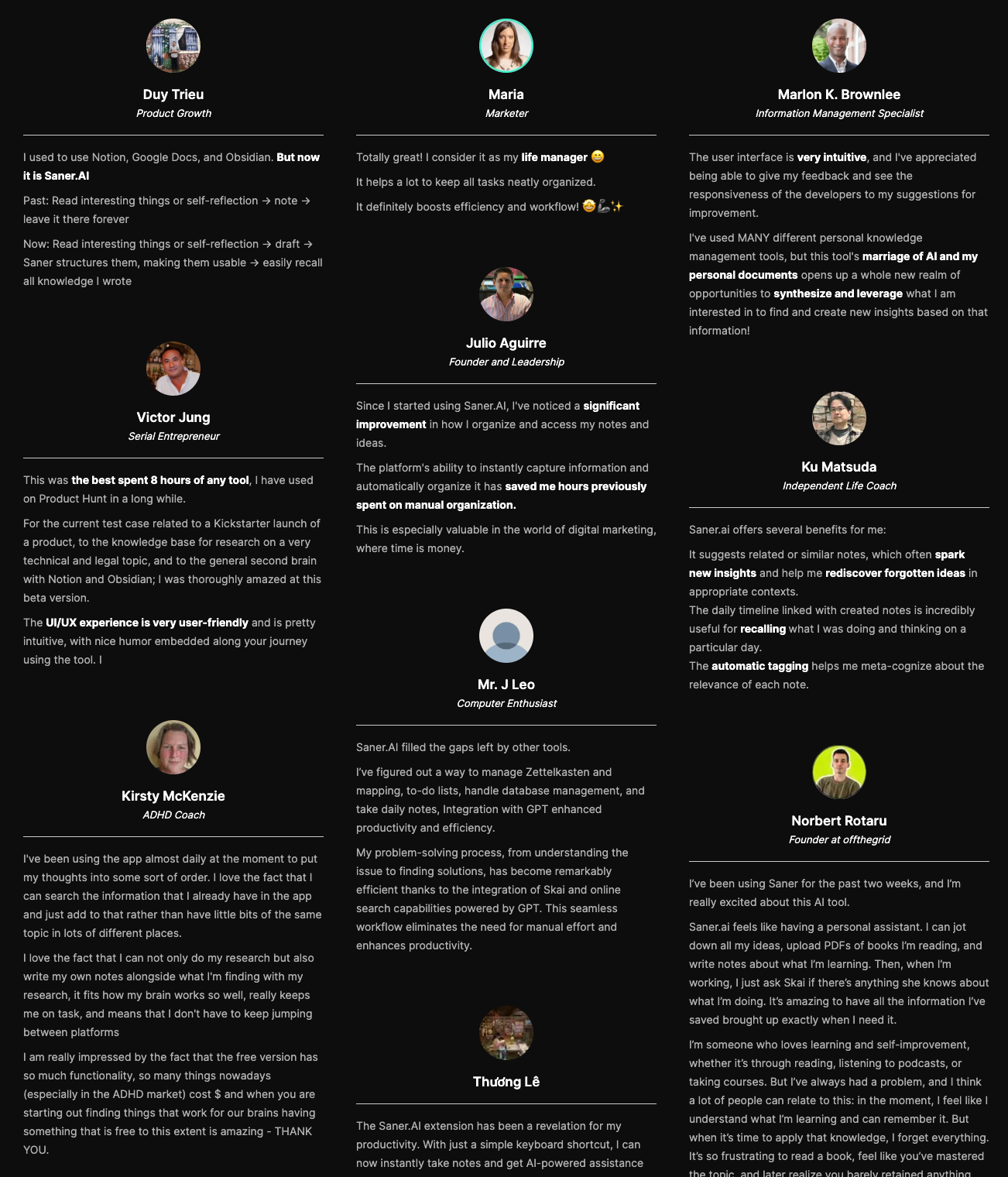
Saner.AI review
How to start using it?
- Connect Gmail and Google Calendar first, then install the Chrome extension and spend a week capturing without organizing anything. The point is to see whether Skai's automatic tagging holds up on your real mess.

AI Agent that Works Instantly without any setup
2. Poke
You give poke.com your phone number, connect Gmail or Outlook, and from then on it lives in iMessage, SMS, WhatsApp, or Telegram. Cognition acquired it on July 23, 2026.
Key features
- No app, no dashboard. Everything happens in a thread you already check. Setup takes about a minute.
- Proactive nudges. It messages you first about rescheduled meetings, overlapping bookings, and things you flagged.
- Automations via recipes, webhooks, and MCP. More configurable than the interface suggests, and there's a public recipe directory.
Pros
- Zero adoption friction.
- The free tier is ok, not a trial. Connect your apps and calendar without a card.
Cons
- Nothing you tell it lives anywhere structured. No task list, no notes database, nothing you can search later. For an assistant reading your whole inbox, that's a lot of amnesia.
- Time handling is inconsistent, which is a rough failure mode for a product about your calendar.
- The onboarding "bouncer" persona divides people. One Product Hunt reviewer flagged it as off-putting alongside "Some integrations/tools can be slow." (reviews)
- No Google Workspace support, and iCloud and Yahoo aren't on the roadmap.
Pricing
- Free — $0 — connect apps, email, and calendar. No card required.
- Pro — $19/month — frontier models on complex tasks, background automations, higher limits.
- Ultra — $199/month — frontier models on every action, Poke Human for real-world tasks, pay-as-you-go beyond credits.
What users say
- Enthusiasts consistently describe it as the first assistant that feels genuinely proactive rather than a chatbot with a scheduler bolted on.
- Skeptics consistently land on the same thing: charming, fast, and forgetful in the ways that matter.
Best for: people who run their life from a phone and want notification, not a system.
Getting started: text it, connect one inbox, and give it three days of real traffic before deciding. Watch specifically for how it handles a time zone or a reschedule, because that's where it wobbles.
3. ChatGPT
ChatGPT is the default answer for most people leaving Lindy, and for good reason. Agent Mode runs multi-step work on its own virtual computer, Scheduled Tasks handles recurring briefings, and Projects keeps context together. It does more than Lindy ever did. It just doesn't watch anything.
Key features
- Agent Mode. Browses, fills forms, edits files, and works across connected accounts, then hands you the result.
- Scheduled Tasks. Relaunched June 17, 2026 with its own sidebar. Set a prompt to run daily and it pushes the output to you.
- Cross-chat memory and Projects. It remembers your context between sessions without you re-explaining.
Pros
- One subscription covers the assistant work plus everything else I use AI for. Nothing else here is that broad.
- Agent Mode genuinely finishes long research and admin jobs I would have shelved.
- The $8 Go tier is a real budget option now, and it's available in roughly 98 countries.
Cons
- No event triggers. Nothing starts unless you start it, so "when this email arrives, do that" isn't a thing.
- Scheduled Tasks runs on a clock, tops out around once an hour, and auto-pauses if you ignore it.
- Agent Mode is capped at 40 tasks a month on Plus. That sounds like plenty until you use it properly.
- Free and Go tiers carry ads in the US, and Deep Research, Agent Mode, and Sora are all behind Plus.
Pricing
- Free — $0 — limited model access, ads in the US, no Agent Mode or Deep Research.
- Go — $8/month — more volume, projects, tasks, custom GPTs. Still ads, still no Agent Mode.
- Plus — $20/month — flagship model, Agent Mode, Deep Research, Tasks, Sora, Codex. Ad-free.
- Pro — $200/month — highest limits, 250 Deep Research runs a month, Pulse.
- Business — $25/seat/month — shared workspace, admin console, no training on your data.
What users say
- Reviewers rate breadth and Agent Mode highly, and rate reliability lower: G2's 2026 analysis found accuracy or hallucination flags in 10.5% of ChatGPT reviews, the highest of the four major assistants it measured.
- The most common complaint from ex-Lindy users is the silence. It never comes to you.
Best for: people who want one AI subscription to cover everything and are fine driving it themselves.
Getting started: set up two Scheduled Tasks before you touch anything else, a morning brief and an end-of-week review. That's the closest ChatGPT gets to Lindy's behaviour, and it takes about ten minutes.
4. Claude
Claude is the tool I trust most with a decision and least with a deadline. It's exceptional on long documents, careful writing, and agentic file work through Cowork and Claude Code. But it has no clock and no triggers, so as a replacement for an assistant that texts you at 8am, it's honest to say it isn't one.
Key features
- Cowork with scheduled tasks. Runs recurring jobs from the desktop app, with connectors for Gmail, Calendar, Notion, and Drive.
- Full read/write Google Calendar. It can create, move, and RSVP to events from a chat.
- Projects and memory. Context persists, and Skills let you package a repeatable workflow once.
Pros
- The output quality on anything long or nuanced is the best here. I don't re-check its document work the way I re-check others.
- Cowork's scheduled tasks give it real background capability, which most people don't realise it has.
- Free tier is usable, and Pro at $20 is the same price as ChatGPT Plus.
Cons
- The Gmail connector drafts but does not send. That's a hard ceiling for inbox delegation.
- No event triggers at all. Cowork's schedules run on a fixed clock, and there's no inbox for work to land in.
- Scheduled tasks require the desktop app open and the machine awake, which is a real-world annoyance.
- No native reminders that fire on their own.
Pricing
- Free — $0 — web, desktop, and mobile with rolling usage limits.
- Pro — $20/month, or $17/month billed annually — higher limits, Projects, Claude Code allowance.
- Max — $100 or $200/month — 5x or 20x Pro usage.
- Team — $25/seat/month ($20 annually) — shared workspace and admin controls.
What users say
- Reliability is where it wins: G2's 2026 data found hallucination or accuracy concerns in 6.2% of Claude reviews, the lowest of the assistants compared.
- The consistent gripe from people using it as an assistant is that it composes beautifully and then waits for you to press send.
Best for: writers, analysts, and anyone whose bottleneck is thinking quality rather than inbox volume.
Getting started: connect Google Workspace, then build one Cowork scheduled task that preps you for tomorrow's meetings using your calendar and recent email threads. If that single job earns its keep, the rest follows.
5. Gemini
Google spent 2026 turning Gemini from a chatbot into something that opens your mail before you do. Daily Brief landed at I/O 2026 as a morning agent that reads Gmail, Calendar, Keep, Photos, and your chat history, then hands you a ranked digest. AI Inbox drafts replies and marks to-dos done. If you're a Gmail person, this is the least work of anything here.
Key features
- Daily Brief. An overnight digest of what matters today, with suggested next steps.
- AI Inbox in Gmail. Surfaces critical to-dos, drafts replies, and links the relevant Docs and Sheets.
- Deep Research over your own Drive and Gmail. Not just the web.
Pros
- It works where I already am. No new app, no new habit, no migration.
- Google AI Plus at $4.99 is the cheapest way onto a paid assistant tier anywhere in this comparison.
- Storage and YouTube Premium bundled into the Pro tier make the effective price hard to argue with.
Cons
- Daily Brief is US-only, personal accounts only, and paid-only. No Workspace, no education accounts, no free tier.
- Gemini's AI features live inside Gmail. If you run Outlook alongside Gmail, half your email gets nothing.
- Outside Daily Brief, it doesn't process your inbox in the background. It helps you write faster, not decide what deserves a reply.
- The compute-credit limits make it hard to predict when you'll hit a cap.
Pricing
- Free — $0 — Gemini app with limited access to the flagship model.
- Google AI Plus — $4.99/month — Daily Brief and AI Inbox, higher limits.
- Google AI Pro — $19.99/month — full flagship access, 1M context window, Deep Research, 5TB storage.
- Google AI Ultra — $99.99 or $199.99/month — 5x or 20x Pro limits, 20TB, YouTube Premium.
Best for: Gmail and Google Calendar users in the US who want proactive triage without adopting anything new.
Getting started: turn on Daily Brief and give it a week before tuning. Then go into the Memory screen and read what it has stored about you, because the feature only works to the extent you grant it access, and you should make that trade deliberately.
6. OpenClaw
OpenClaw is the most interesting thing on this list and the one I'd tell most people not to run. It's an open-source personal agent under MIT license that lives on your own machine, connects to WhatsApp, Telegram, Discord, Slack, and 22 other channels, and runs on whatever model you point it at. Creator Peter Steinberger joined OpenAI in February 2026 and moved the project to a non-profit foundation, with OpenAI sponsoring it while it stays open source.
Key features
- Runs on your hardware. Your context, memory, and skills stay local. Nothing sits in someone else's product roadmap.
- Proactive by design. Cron jobs, heartbeats, and background tasks mean it acts without you asking.
- Model-agnostic. Claude, GPT, Gemini, DeepSeek, or a local model via Ollama. You bring the API key.
Pros
- It costs nothing but model tokens, which for light use is genuinely a few dollars a month.
- No vendor can reprice it, pivot it, or delete a feature I depend on. That's worth more than it sounds after the year Lindy just had.
- The skills ecosystem moves faster than any commercial roadmap here. One early user put the appeal plainly: "your context and skills live on YOUR computer, not a walled garden." (reviews) Openclaw
Cons
- The security record is the headline. SecurityScorecard observed 40,214 internet-exposed instances in February 2026, with 35.4% flagged vulnerable, and Gartner published a note recommending enterprises block it outright.
- The skills marketplace was poisoned. Researchers found hundreds of malicious skills on ClawHub, mostly delivering macOS infostealers.
- Setup assumes comfort with a terminal, a config file, and reading a CVE advisory. It is not a consumer product.
Pricing (GitHub)
- Self-hosted — $0 — MIT license, you pay only your model provider.
- Managed hosting — varies by third-party provider — pre-configured instance, updates handled for you.
What users say
- The enthusiast reviews are among the most excited I've read about any software, full stop. Persistent memory, real autonomy, and total ownership.
- The security community's assessment is the opposite and equally emphatic. Both groups are describing the same product accurately.
Best for: developers and technically confident users who want ownership and will actually harden the deployment.
Getting started: run it on an isolated VM, not your daily machine. Bind to loopback, use burner accounts for every integration, set a strict tool allowlist, and update before you connect anything real. If any of that sentence sounded like work, pick something else on this list.
Conclusion
The split that decides this whole category isn't price or feature count. It's whether the assistant only tells you things or actually holds onto them.
- Poke, Gemini, and Lindy are excellent at the moment of notification and weak at everything before it.
- Claude and ChatGPT are the opposite: superb judgment, no clock, no triggers, nothing happens unless you show up.
- Saner.AI sits between the two and does the part almost nobody else does, which is keeping what you captured somewhere you can find it three weeks later.
So work backwards from your actual bottleneck. If it's "I keep missing things," get a proactive assistant. If it's "I keep losing things," get one with a real memory layer. If it's "I need to think harder about this," get Claude and stop shopping.
And if the honest answer is that you don't know yet, start free: Saner.AI, Poke, ChatGPT, and Gemini all have free tiers that will tell you more in a week than another comparison article will.
Pick one, connect one inbox, and give it five working days.
Stay on top of your work and life effortlessly
FAQ
What is the best Lindy alternative in 2026?
Saner.AI is the best overall Lindy alternative for most people, at $8/month billed annually with a free tier. It handles the proactive daily planning Lindy does, and unlike the text-based assistants, it keeps your tasks, notes, and email in one searchable workspace. If you specifically wanted Lindy's text-message interface, Poke is the closer match.
Is Lindy still worth it in 2026?
For some people, yes, but the value proposition changed a lot in February 2026. Lindy dropped its free plan, repriced to $49.99/month minimum, and stopped publishing credit numbers for its assistant tiers. If you want inbox triage over iMessage and are comfortable with a meter you cannot estimate in advance, it works well. If cost predictability matters, look elsewhere.
Does Lindy still have a free plan?
No. The old 400-credit free plan was discontinued during the early-2026 repricing. What's left is a 7-day free trial (no credit card required to start), after which the minimum is $49.99/month. Any guide still describing 400 free credits or a $299 Business tier predates the change.
Can ChatGPT replace Lindy?
Partly. ChatGPT covers the work Lindy does and much more, through Agent Mode, Scheduled Tasks, and Projects. What it cannot do is react: there are no event triggers, so nothing fires when an email lands. Scheduled Tasks runs on a clock at roughly once an hour and pauses itself if you ignore it. Great replacement for the doing, poor replacement for the watching.
Is there a free Lindy alternative?
Yes, several. OpenClaw is free and open source under MIT if you're willing to self-host and harden it. Saner.AI, Poke, ChatGPT, Gemini, and Claude all have free tiers that cover real daily use, though the proactive features are usually paid. Gemini's Daily Brief specifically requires a paid plan, a personal Google account, and a US location.
How much does an AI executive assistant cost in 2026?
The realistic range for individuals is $0 to $20 a month. Saner.AI starts at $8, Poke Pro is $19, Claude Pro and ChatGPT Plus are $20, and Google AI Pro is $19.99. Lindy at $49.99 sits well above the market. Above $100 you're into power-user tiers (ChatGPT Pro, Claude Max, Poke Ultra) that are about volume, not extra capability.
Is OpenClaw safe to use?
Not with default settings, and not on a machine that matters. SecurityScorecard observed over 40,000 internet-exposed instances in February 2026 with 35.4% flagged as vulnerable, and Gartner published a note advising enterprises to block it. It can be run more safely on an isolated VM with loopback binding, strict tool allowlists, and burner accounts, but no configuration removes the risk entirely.
Can Claude read and send my email?
Claude can read your email and write drafts, but it cannot send from Gmail. Anthropic's Google Workspace connector is explicitly draft-only. The Microsoft 365 connector can send Outlook mail as of July 2026, but only if an admin turns on write tools, which are off by default. For inbox delegation, that's the ceiling.
What's the best Lindy alternative for ADHD?
Saner.AI, and it isn't close among the tools here. It was designed around ADHD pain points rather than labelled that way afterward, which shows in the capture-first design, the single workspace, and the proactive morning plan. CDC data puts 15.5 million US adults at a current ADHD diagnosis, about half diagnosed after 18, so this is a much larger audience than most productivity tools build for.
Do these tools work with Outlook?
Mostly. Lindy, Poke, and Saner.AI all connect to Outlook alongside Gmail. Claude connects through Microsoft 365, with the write permissions caveat above. Gemini is the outlier: its AI features live inside Gmail only, so if you split your day between Outlook and Gmail, half your mail gets nothing.
Which Lindy alternative has the best long-term memory?
Saner.AI and OpenClaw, for opposite reasons. Saner.AI stores what you capture in a structured, semantically searchable workspace you can query months later. OpenClaw keeps persistent memory locally on your own hardware, so nothing depends on a vendor's retention policy. Poke, by contrast, keeps everything in a text thread, which you can scroll but cannot really search.
Why did Lindy get more expensive?
The company relaunched between January and March 2026 from a no-code agent builder into a consumer AI executive assistant. Along with the new Plus, Pro, and Max lineup, it removed the free plan and stopped publishing credit allowances. Its pricing page now benchmarks against an $8,000/month human assistant rather than against other AI assistants, which is how a $49.99 minimum comes to look like a bargain.
Get your AI personal assistant without complicated setup
👉 You may like this post on the best AI personal assistants and the top Free AI tools