How do I find my Delta frequent flyer number? The simplest way


How do I find my Delta frequent flyer number?

Hey everyone!
I've noticed a lot of chatter lately about folks having trouble remembering their Delta frequent flyer number.
It seems like a common issue: you're all set to book a flight and bam, you need to enter that elusive number.
So, I thought it would be super helpful to put together a little guide with some easy tips to help you quickly find or remember your Delta frequent flyer number. Whether you're a seasoned traveler or just starting out with Delta, these pointers should make your life a bit easier!
There are 2 ways to do this: the manual way and the Saner.AI way.
1. Use the manual way
Here’s a step-by-step guide to finding it manually, along with some advantages and disadvantages of this method.
The Manual Search Method:
-
- Start with your email: Open your email inbox and search for any emails from Delta. Your frequent flyer number might be mentioned in the body of an email or even in the subject line. This may be time consuming if you are not really good at organizing your emails.
-
- Visit Delta’s website: If your email search doesn’t turn up your number, the next place to check is Delta’s official website. Go to the “My Profile” section after logging in. Here, not only can you find your frequent flyer number, but you can also see other important details related to your travels and account settings.
Advantages
-
- No need for extra tools: You don’t need any special software or apps; just access to your email and the internet.
-
- Privacy control: You handle all the searching yourself, which means your personal information isn't shared with third parties.
Disadvantages
-
- Time-consuming: Depending on how organized your emails are, or how familiar you are with the Delta website, this process can take a bit of time.
-
- Potential for missing information: If emails have been deleted or if the website is down, you might not be able to find your number when you need it.
-
- Requires internet access: You need to have access to the internet to search through emails or log into the Delta website, which might not be possible everywhere
2. Use Saner.AI
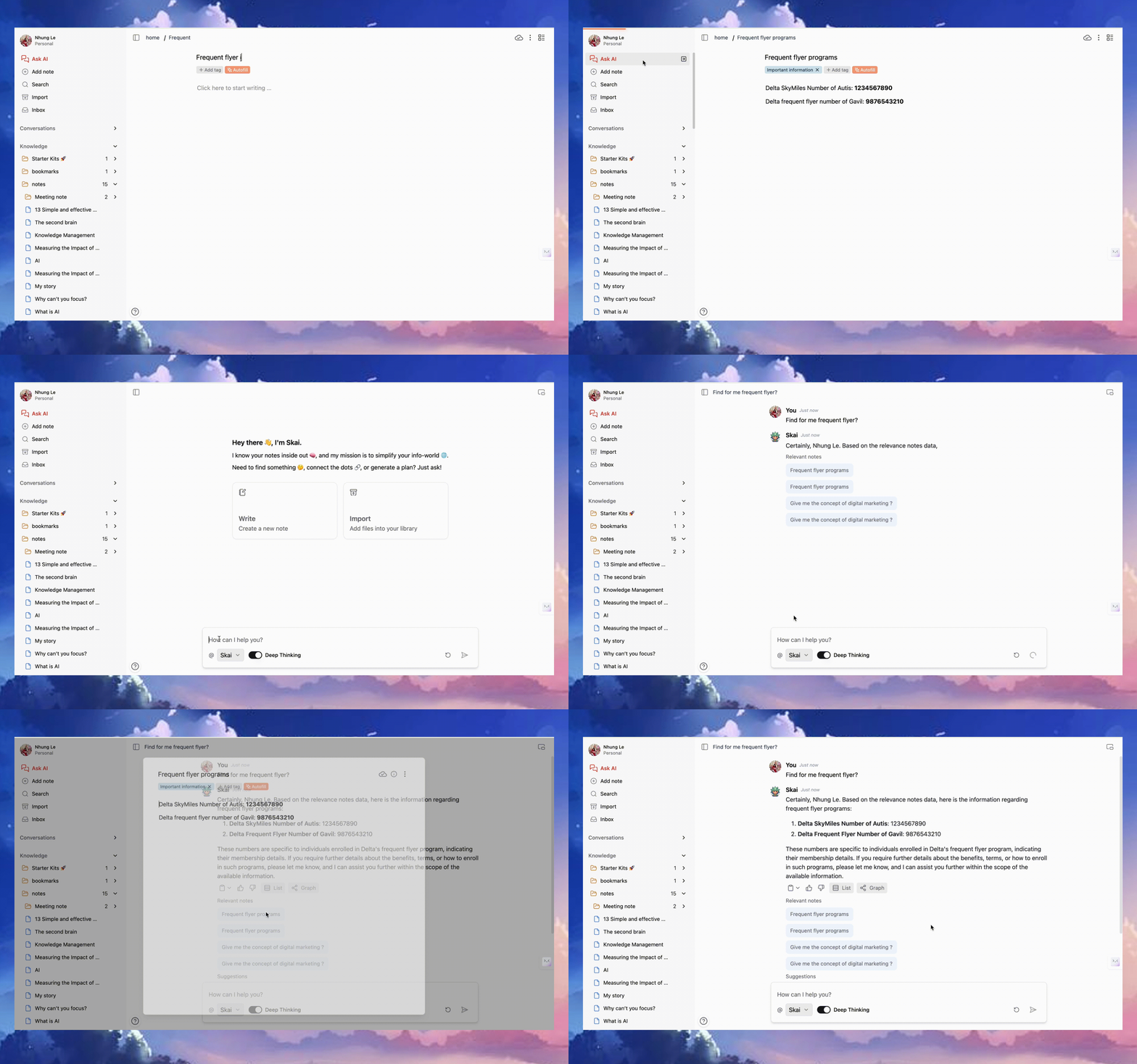
Using Saner.AI to find your Delta frequent flyer number can make the process much easier and faster than traditional methods. Here’s how it works:
- Wrote down your Frequent flyer number one time only
- Search for Your Number anytime anywhere: Simply ask AI “Delta frequent flyer”. It will show your frequent flyer number almost instantly with citation
- Search for Your Number anytime anywhere: Simply ask AI “Delta frequent flyer”. It will show your frequent flyer number almost instantly with citation
Advantages
-
- Speed: One of the biggest benefits is how quickly you can find your number. Instead of sifting through emails manually, saner.ai does the heavy lifting in seconds.
-
- Convenience: Everything is done within one platform — no need to jump between your email and the Delta website.
-
- Efficiency: Reduces the chance of overlooking the number, as the AI is designed to specifically find and highlight this information for you.
Disadvantages
-
- Requires internet access: You need to have access to the internet to search through emails or log into the Delta website, which might not be possible everywhere.

Stay on top of your work and life