How To Build a Second Brain For ADHD


The short answer
A second brain for ADHD is an outside system that holds what your working memory drops: ideas, tasks, links, "don't forget" moments. The version that works for ADHD has one capture point, very little filing, and search or AI that finds things for you, so it keeps working through the weeks you fall behind.
If you've ever built a gorgeous Notion setup on a Sunday and abandoned it by Wednesday, this post is for you. I'm going to skip the productivity-guru perfection and focus on what holds up on a bad week.
What you'll get here:
- Why ADHD brains leak information
- Why classic second brain methods keep breaking for ADHDers
- A 7-step setup you can start in 15 minutes
- How to build the whole thing inside Saner.AI, an AI second brain for ADHD
What is a second brain (and why ADHD needs a different version)?
A second brain is a trusted place outside your head where you store what you'd otherwise try to remember. The term was popularized by Tiago Forte, whose method has you capture, organize into four buckets (Projects, Areas, Resources, Archives), distill, and then use your notes.
That method is good, but it assumes you'll file things every day and review every week. For a lot of ADHD brains, the filing step is the first thing to go, and once the inbox piles up, you stop trusting the system. Then you stop opening it.
So the ADHD version flips the priorities:
- Capture is the only habit you must keep
- Organizing is mostly done for you (by search, tags, or AI)
- The system comes to you with reminders, instead of waiting for you to remember to check it
- Recovery after a messy week takes minutes, not a full rebuild.
Why classic second brain setups break for ADHD

Here's where it usually goes wrong:
- Ideas end up in five places at once: Notes, a WhatsApp chat with yourself, two notebooks, and a browser tab you swear you'll come back to.
- "Which folder does this go in?" is just enough of a speed bump to make you not write it down at all.
- Designing the perfect template is fun and dopamine-friendly. Using it on a random day is not.
- If the system doesn't remind you, you won't remember to look. Most note apps ignore this part completely.
- Every "fresh start" in a new app resets your notes and your trust. A messy inbox in the same app is easier to recover from than a clean start somewhere else.
- A missed week feels like failure, and that feeling makes the app unsafe to open.
5 rules for an ADHD-friendly second brain
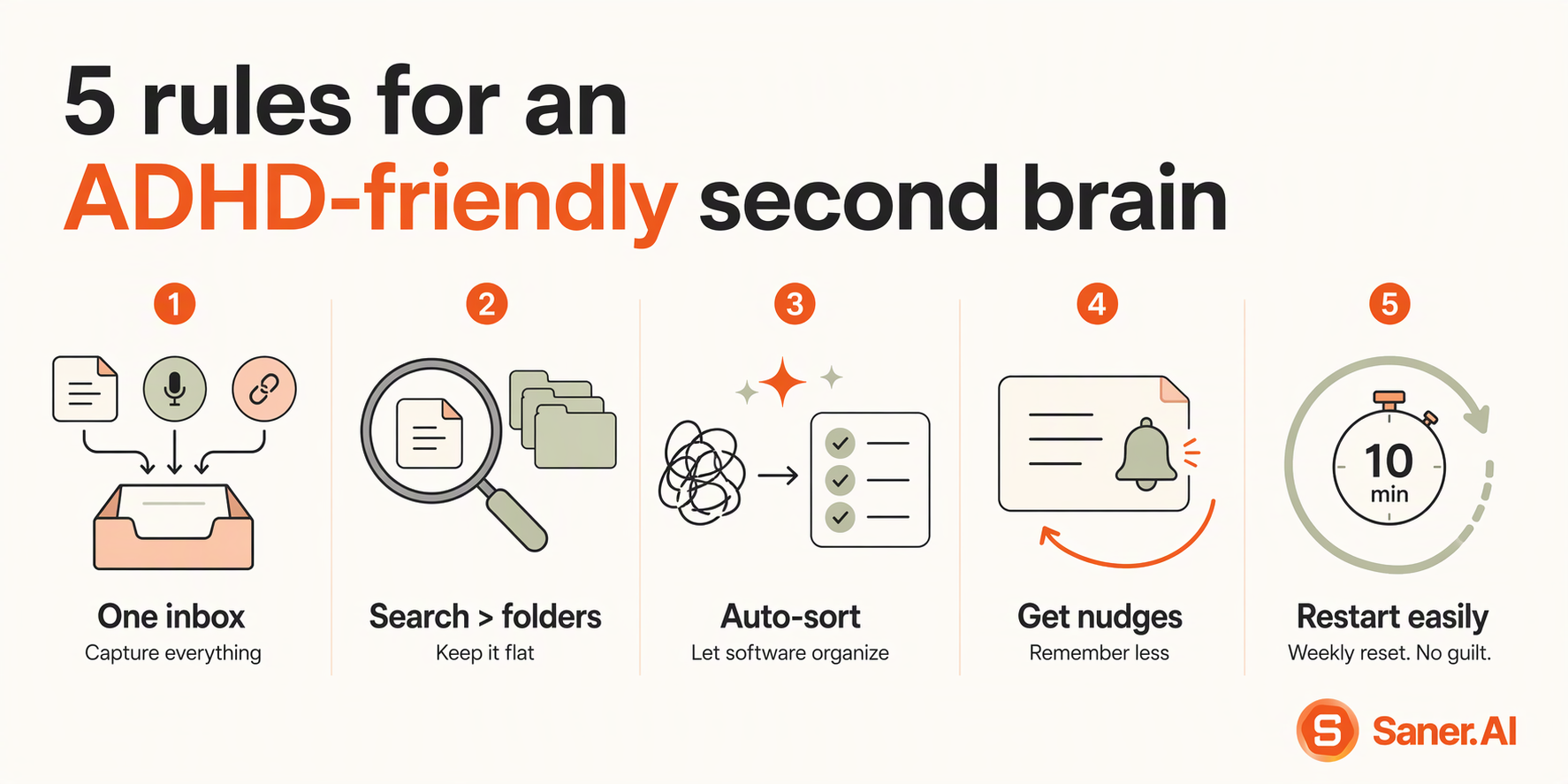
1. One inbox for everything
One place on your phone, laptop, and browser where every idea, task, link, and voice memo lands. No sorting at the door. If you have to think about where it goes, you won't capture it.
2. Search beats folders
Keep structure flat. A few folders are plenty. You'll find things by searching or asking ("what did Ann say about the budget?"), not by remembering which sub-sub-folder you used in March.
3. Let the system do the sorting
Tagging, linking related notes, and turning a ramble into a task list are exactly the chores ADHD brains skip. Hand them to software.
4. Bring things back to you
Your second brain should nudge you about deadlines and forgotten follow-ups, so you don't have to remember to remember.
5. Make restarting cheap
Replace the daily review you'll abandon with a 10-minute weekly reset. When you fall off (you will, everyone does), you come back to one inbox and clear it, with no guilt and no rebuild.
How to build a second brain for ADHD in 7 steps
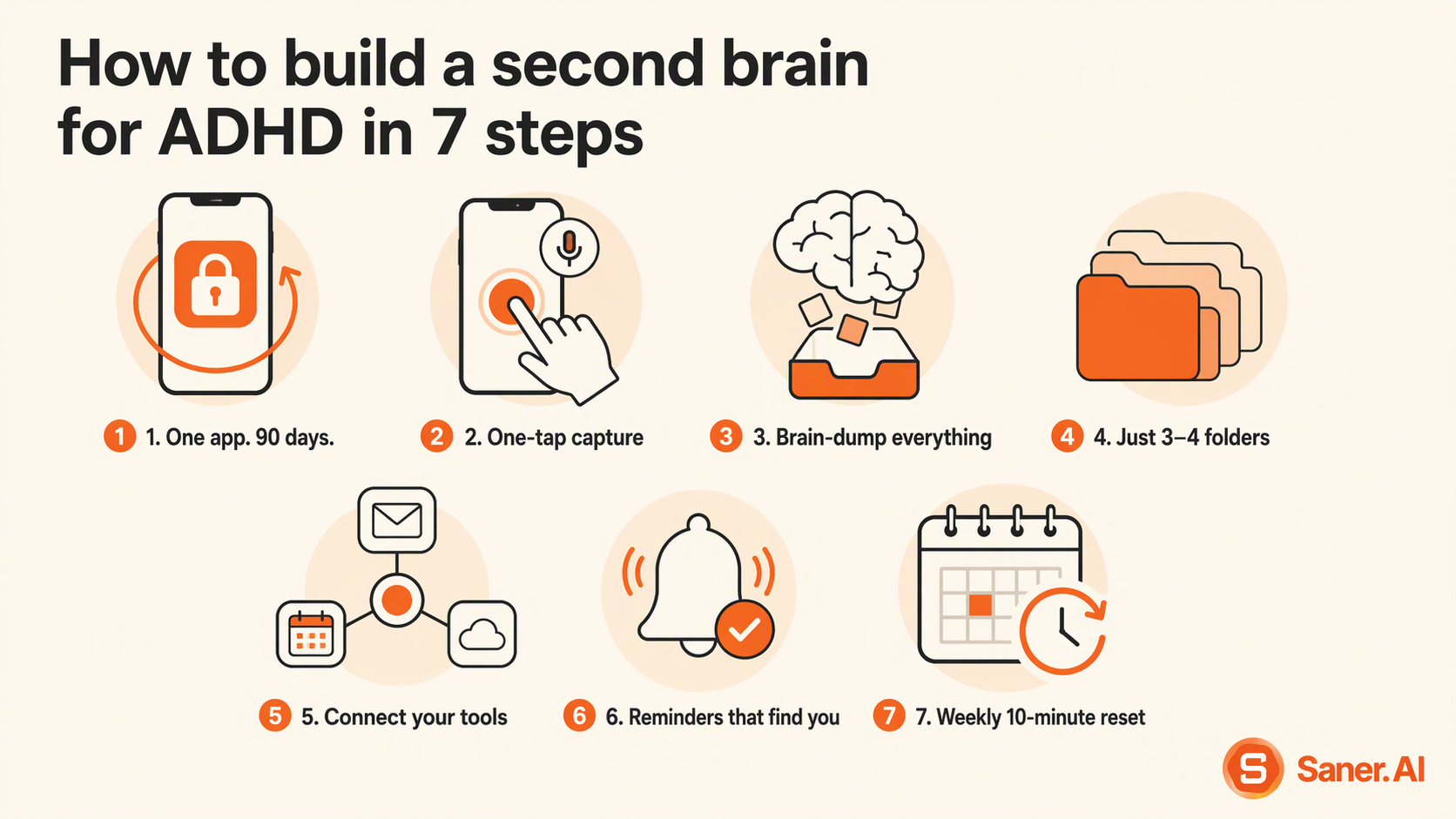
- Pick one app and promise yourself you won't switch for 90 days.
- Choose something with fast capture on mobile, good search, and reminders. (An AI-first app can help a lot here. More on that below.)
- Make capture one tap away everywhere.
- Put the app on your phone's home screen, install the browser extension, and turn on voice notes. Capture should take less than 10 seconds.
- Brain-dump everything that's living rent-free in your head.
- Tasks, worries, half-ideas, that email you need to answer. Don't organize. Just empty the tank.
- Create no more than 3–4 folders.
- For example: Work, Life, Learning, Archive. Stop there. Resist the urge to build a taxonomy.
- Connect where your information already lives.
- Email, calendar, and cloud docs. The fewer places you have to check, the less you'll forget.
- Set up reminders that find you.
- Deadlines, follow-ups, and a daily "here's what matters today" summary. This is the external "point of performance" cue Barkley talks about.
- Book a 10-minute weekly reset in your calendar.
- Clear the inbox, archive what's done, pick your top 3 for next week. Put it in the calendar, not in your head.

That's it.
How to build your ADHD second brain with Saner.AI
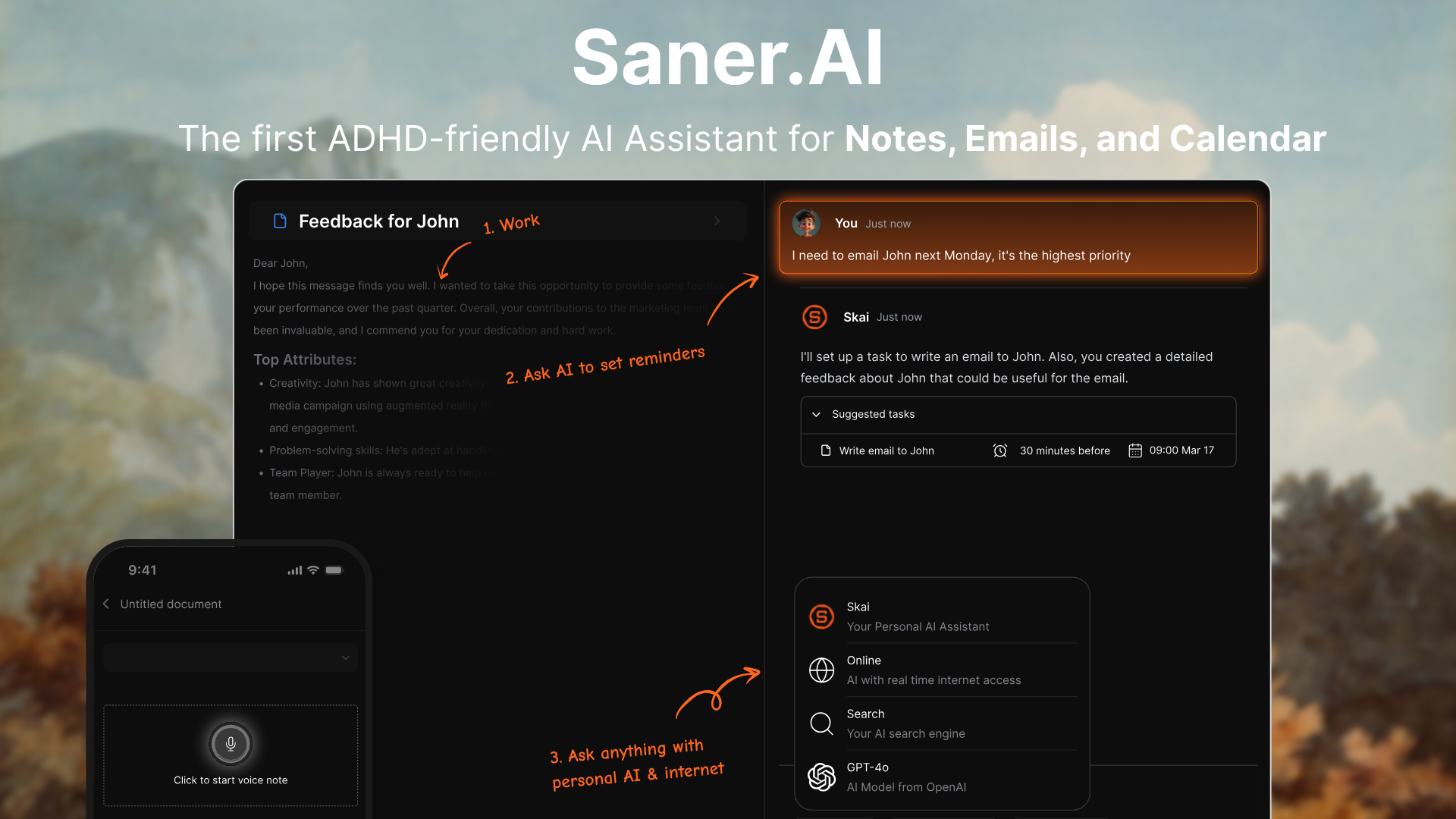
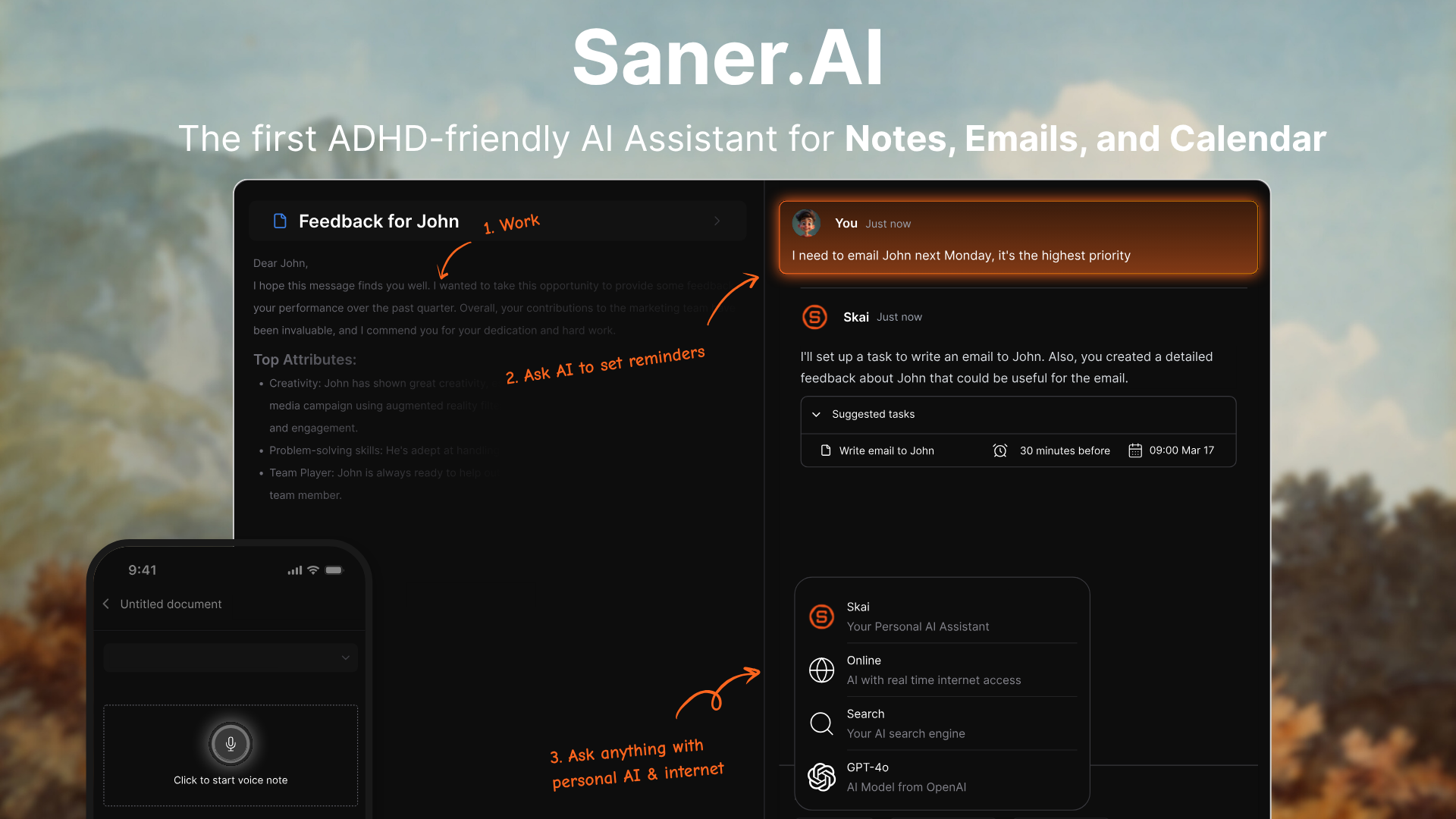
Saner.AI is an AI personal assistant for notes, email, calendar, and tasks, built for ADHD brains. You dump things in, and its assistant, Skai, organizes them, finds them when you ask, and plans your day with you. One of the co-founders has ADHD, and the app grew out of his own search for something that worked.
Step 1: Capture from anywhere, in seconds
- The Chrome extension lets you write without leaving the tab you're on.
- Voice-to-text on the mobile app
- You can upload PDFs and import existing notes (OCR handles text in images).
- Smart Add lets you type whatever's on your mind; Skai can save it as a note, turn it into a task, and file it into a related folder
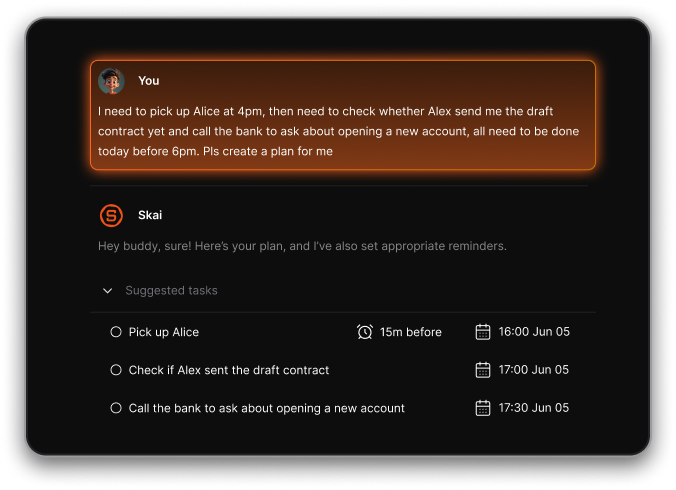
Step 2: Find anything by asking
For ADHD, this is the step that matters most. You don't need to remember where you saved something, or even the exact words.
- You can ask Skai across your notes, files, and connected sources, and it cites the notes it used so you can check them.
- "Relevant Notes" surfaces related things you saved in the past, so old ideas resurface on their own.
Step 3: Connect email, calendar, Slack, and Drive
Saner.AI pulls information in from Gmail, Google Calendar, Slack, and Google Drive, and the Outlook mail and calendar connector became available to all users. Synced emails and events show up as notes Skai can read
Step 4: Let Skai come to you
This is the "point of performance" piece. With Skai Proactive, every morning (or at a time you choose), Skai checks your calendar, overdue tasks, and recent notes and gives you a summary of what needs attention. On mobile, Live Activities keep your current focus task on the lock screen
You don't have to remember to open your second brain. It opens the conversation.
Step 5: Do a 10-minute weekly reset with Skai
Once a week, open the Smart Inbox and the chat, then ask:
- "What's still open from this week, and what can I drop?"
- "Move anything overdue to next week and pick my top 3."
Apply Skai's suggestions, archive what's done, close the laptop. Done.
What it costs
- Saner.AI has a free plan, a Starter plan at $8/month, and a Standard plan at $16/month with unlimited notes, with about 20% off yearly
Want the full walkthrough? Read how to use Saner.AI: the ultimate guide, or see why we call it an ADHD tool for adults.
Common mistakes (and how to bounce back)
The biggest mistake is treating a lapse as the end of the system. Your second brain should expect you to disappear for a week and welcome you back without a lecture.
- Over-building on day one. Skip templates and dashboards until you have at least a month of notes. Capture first.
- Tagging everything by hand. Let AI suggest tags and only fix the ones that are clearly wrong.
- Switching apps when it gets messy. Mess is normal. Ask Skai to sort the inbox before you blame the tool.
- Relying on willpower to check it. Turn on the morning summary and reminders so the system comes to you.
- Expecting an app to replace care. A second brain supports your executive function; it isn't treatment. A doctor, ADHD coach, or therapist can help a lot, and CBT for adult ADHD has solid trial evidence.
Fell off for two weeks? Do this: open the inbox, ask Skai "what's urgent from the last two weeks?", deal with those, and archive the rest. Fifteen minutes and you're back.
FAQ: second brain for ADHD
What is a second brain for ADHD?
It's an external system (usually an app) that holds your ideas, tasks, and information so your working memory doesn't have to. For ADHD, it works best with one inbox, minimal filing, strong search, and reminders that come to you.
What's the best app for an ADHD second brain?
The best app is the one you'll actually open on a bad week. Look for fast capture, search by meaning, automatic organizing, and proactive reminders. Saner.AI was built around those needs for ADHD brains. For a broader comparison, see our list of the best AI productivity tools.
Is Notion or Obsidian good for ADHD?
Both are powerful, and some ADHDers love them. They do rely on you to design the structure, file notes, and remember to check them, which is where many ADHD setups fall apart. If you enjoy building systems, they can work. If you don't, an AI-first tool removes most of that upkeep.
Does PARA work for ADHD?
PARA (Projects, Areas, Resources, Archives) is a fine way to group things, but treat its four buckets as the maximum, not the minimum. With AI search, you can skip a lot of the filing PARA normally asks for.
How long does it take to set up?
About 15 minutes for the basics: install the app, set up capture on your phone and browser, and do one brain dump. Everything else can wait until you've used it for a week.
Can AI really organize my notes for me?
Yes, for most of the boring parts. Tools like Saner.AI suggest tags and folders, link related notes, pull tasks out of emails, and answer questions from your saved notes. You still review and approve, which keeps you in control.
Is a second brain a replacement for ADHD treatment?
No. It's a support tool. Research on adults with ADHD shows that organizing and planning skills help alongside medication (Safren et al., JAMA, 2010), and a second brain gives those skills a home. Talk to a healthcare professional about diagnosis and treatment.
Conclusion
You don't need a perfect system. You need one place to put things and something that hands them back when it matters. Start with capture this week, let AI handle the sorting, and add structure only when a real problem shows up.
If you want a second brain that organizes itself and checks in on you, try Saner.AI free. No credit card, no learning curve, and no guilt if you disappear for a week.
Stay on top of your work and life effortlessly
Related reads: ADHD productivity · best AI to-do list apps · best AI personal assistants ·