How do I find my American Airlines frequent flyer number? The simplest way


How do I find my American Airlines frequent flyer number?
Hey there!
It seems like a lot of us run into the snag of forgetting our American airlines frequent flyer number right when we need it most—like during flight bookings.
To tackle this common dilemma, I've put together some straightforward strategies to help you retrieve your AAdvantage number with ease.
There are two ways to do this: the manual way and the saner.ai way.
1. Use the manual method
If you need to find your American Airlines frequent flyer number (also known as your AAdvantage number), you can do so by following these steps:
- Start by Clicking:
- Head to the top right of any page and click on “Sign in/Join now.” You’ll be directed to the member sign-in page.
- Need a Little Help? Click on the “Need help logging in?” link.
- Forgot Your Number? Next, click on the “Forgot my AAdvantage® number” link and simply follow the directions.
- Check Your Email: Your AAdvantage® account number will be emailed to you shortly.
Call Customer Service:
If you can't find your number through the methods above, you can call American Airlines' customer service. Be prepared to provide some personal information to verify your identity.
The customer service number for American Airlines is 1-800-433-7300 in the USA. For other regions, check the American Airlines website for the appropriate contact number.
Make sure to have some personal information handy (like your full name, address, email, or phone number associated with the account) when you contact customer service, as they will need it to verify your identity and retrieve your AAdvantage number.
Advantages
- No need for extra tools: You don’t need any special software or apps; just access to your email and the internet.
- Privacy control: You handle all the searching yourself, which means your personal information isn't shared with third parties.
Disadvantages
- Time-consuming: Depending on how organized your emails are, or how familiar you are with the American airline website, this process can take a bit of time.
- Potential for missing information: If emails have been deleted or if the website is down, you might not be able to find your number when you need it.
- Requires internet access: You need to have access to the internet to search through emails or log into the American Airline website, which might not be possible everywhere
2. Use Saner.AI
Using Saner.AI to find your Delta frequent flyer number can make the process much easier and faster than traditional methods. Here’s how it works:
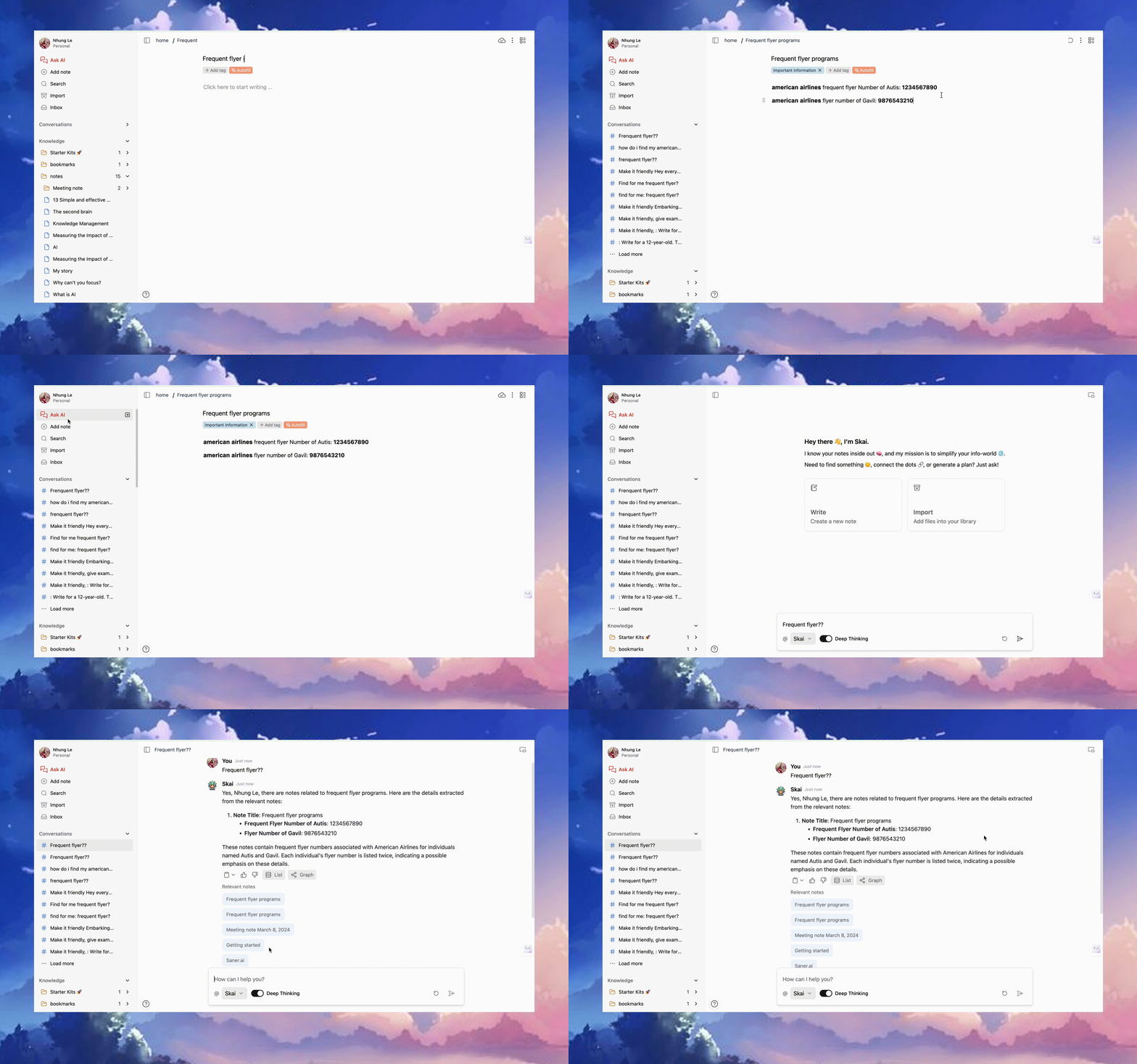
- Wrote down your Frequent flyer number one time only
- Search for Your Number anytime anywhere: Simply ask AI “ American airlines frequent flyer”. It will show your frequent flyer number almost instantly with citation
- Search for Your Number anytime anywhere: Simply ask AI “ American airlines frequent flyer”. It will show your frequent flyer number almost instantly with citation
Advantages
- Speed: One of the biggest benefits is how quickly you can find your number. Instead of sifting through emails manually, saner.ai does the heavy lifting in seconds.
- Convenience: Everything is done within one platform — no need to jump between your email and the American airlines
- Efficiency: Reduces the chance of overlooking the number, as the AI is designed to specifically find and highlight this information for you.
Disadvantages
- Requires internet access: You need to have access to the internet to search through emails or log into the American airline website, which might not be possible everywhere.
Stay on top of your work and life