AI Workflow: How to Build a Simple yet Efficient System


How to build AI workflow
For busy professionals, entrepreneurs, researchers, and individuals with ADHD, the challenge isn’t just having too much work. It’s that the work is scattered across multiple tools, each demanding your attention at different times
This is where an AI workflow comes in - a connected, automated system that works with you to keep things moving, even when you get pulled in 10 different directions.
What Is an AI Workflow?
An AI workflow is a structured daily routine where AI tools assist or automate key steps in your work - like planning your day, sorting emails, researching, scheduling meetings, and wrapping up.
AI Workflow Use Cases You Can Adapt to Your Work
1. Daily Planning & Prioritization
Use AI to start your day with clarity and end it with a plan.
- Morning Briefing: AI scans your calendar, emails, and tasks to give you a single-page “today view.”
Example: “3 meetings today, prep needed for the 2 PM pitch, 2-hour deep work slot at 10 AM.” - Adaptive Task Reordering: When a client call gets moved, AI automatically shifts your priorities.
- Weekly Review Automation: Every Friday, AI compiles a summary of what you achieved, pending tasks, and next week’s key goals.
2. Email & Communication Management
AI can reduce hours of inbox fatigue each week.
- Email Triage: Classify incoming emails into Urgent, Action Needed, and FYI.
- Follow-Up Nudges: AI flags unanswered emails after X days and drafts a quick follow-up for you.
- Conversation Summaries: Get a digest of long Slack or Teams threads in under 1 minute.
- Attachment Finder: AI pulls all recent files from your inbox when preparing for a meeting.
3. Research & Information Gathering
Perfect for entrepreneurs, researchers, or anyone who needs reliable, up-to-date insights.
- Industry Monitoring: AI scans news and industry reports daily, delivering only the most relevant links.
- Quick Deep Dives: Ask for a “5-minute brief” on a topic, complete with sources.
- Competitive Analysis: AI gathers recent product launches or pricing updates from your competitors.
- Data Verification: AI fact-checks stats in your documents before they go public.
4. Writing & Content Creation
AI can help you go from blank page to publish-ready faster.
- Outlining: Provide a topic, and AI drafts a structured outline.
- First Drafts: AI generates base copy for blogs, emails, or proposals you can refine.
- Repurposing Content: Turn a meeting transcript into a newsletter or LinkedIn post.
- Content Optimization: AI suggests headlines, meta descriptions, or improved clarity.
5. Scheduling & Time Management
AI makes sure your time is spent where it matters most.
- Smart Time Blocking: Automatically insert focus time, breaks, and prep slots around meetings.
- Dynamic Rescheduling: AI moves tasks when urgent work pops up.
- Meeting Preparation: AI sends an agenda, past notes, and related docs 15 minutes before a call.
- Travel Time Alerts: AI warns if your back-to-back meetings require physical travel.
6. Project & Task Management
Keep projects moving without manual tracking.
- Task Auto-Creation: Turn email requests or chat messages into tasks with due dates.
- Task Breakdown: AI splits big goals into bite-sized steps with realistic timelines.
- Progress Updates: Automatically update project boards when milestones are reached.
- Dependency Alerts: AI warns if a delayed task will affect other deadlines.
7. Personal Productivity & Focus
AI can keep you anchored when distractions hit.
- Distraction Redirects: AI notices when you’ve been idle on a key task and nudges you back.
- Daily Recaps: AI lists everything you finished today and sets up tomorrow’s to-dos.
- Learning Suggestions: Based on your work, AI recommends new resources to explore.
- Energy Matching: AI schedules heavy work during your most productive hours.
8. ADHD-Friendly Workflow Support
For ADHD-prone individuals, AI can reduce overwhelm and decision fatigue.
- Brain Dump to Action Plan: Speak or type scattered thoughts—AI turns them into organized, prioritized tasks.
- Context Recall: When you revisit a project, AI reminds you of past decisions and relevant notes.
- Proactive Reminders: AI prompts you to work on important but non-urgent items before they become last-minute emergencies.
- Sensory Load Reduction: Centralize tools so you’re not overwhelmed by tabs, alerts, and app switching.
A Real Example: Step-by-Step AI Workflow for a Busy Day
Let’s say you’re a marketing director - here’s what an AI-assisted day could look like:
1. Morning Planning (8:30 AM)
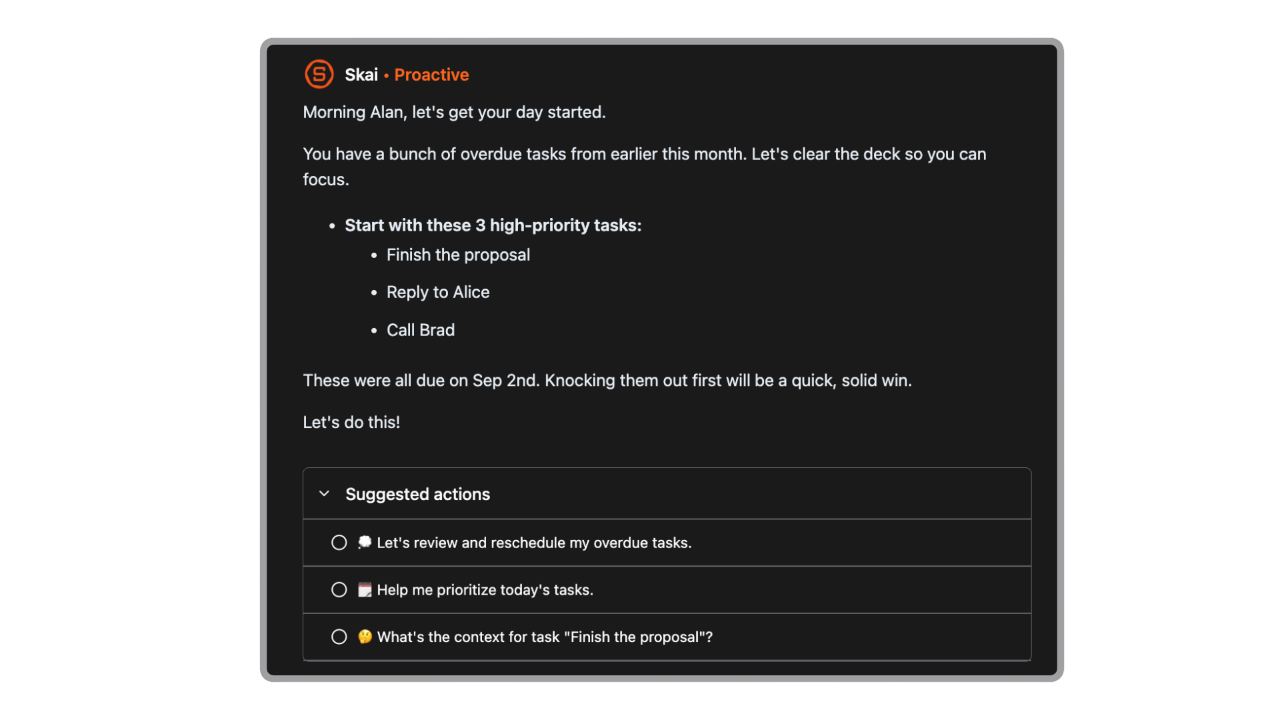
AI automatically scans your calendar, inbox, and task list, then gives you:
- High-priority tasks
- What's on the horizon
- Fresh ideas based on your notes from the past
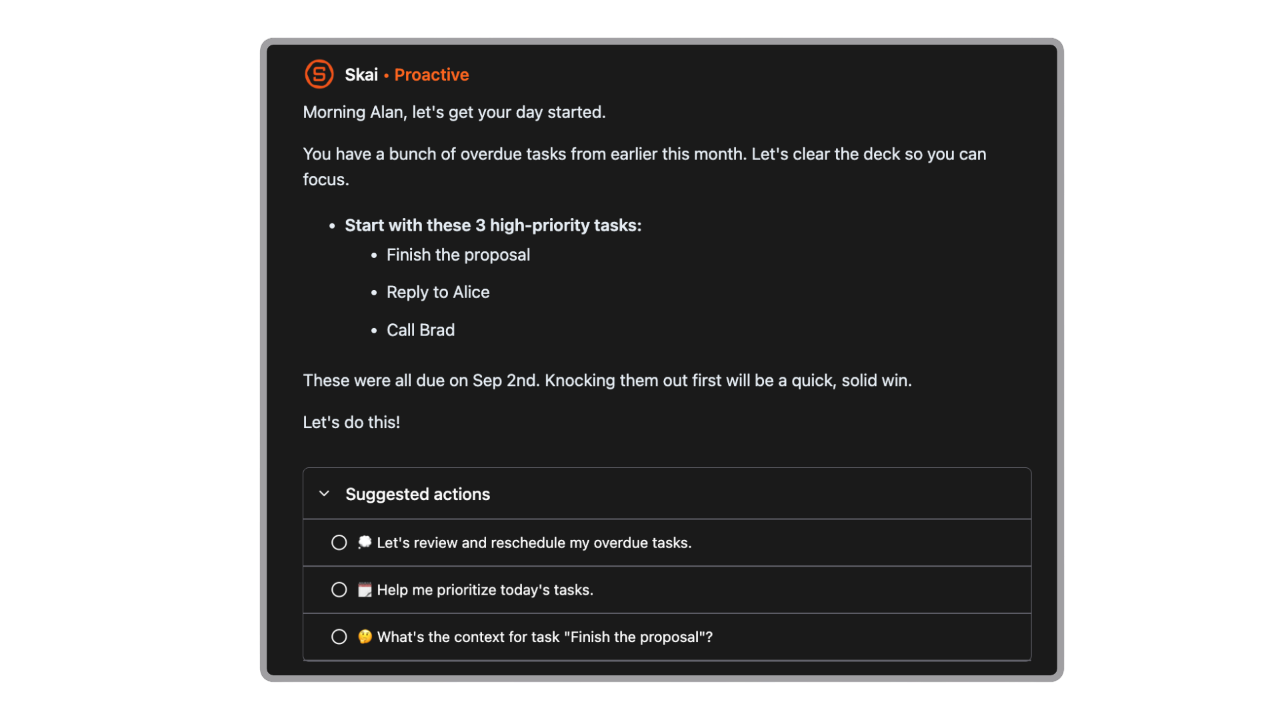
You can follow up with Saner.AI and ask:
“What’s on my plate today?”
Why it works: You start the day with clarity instead of guessing what’s most urgent.
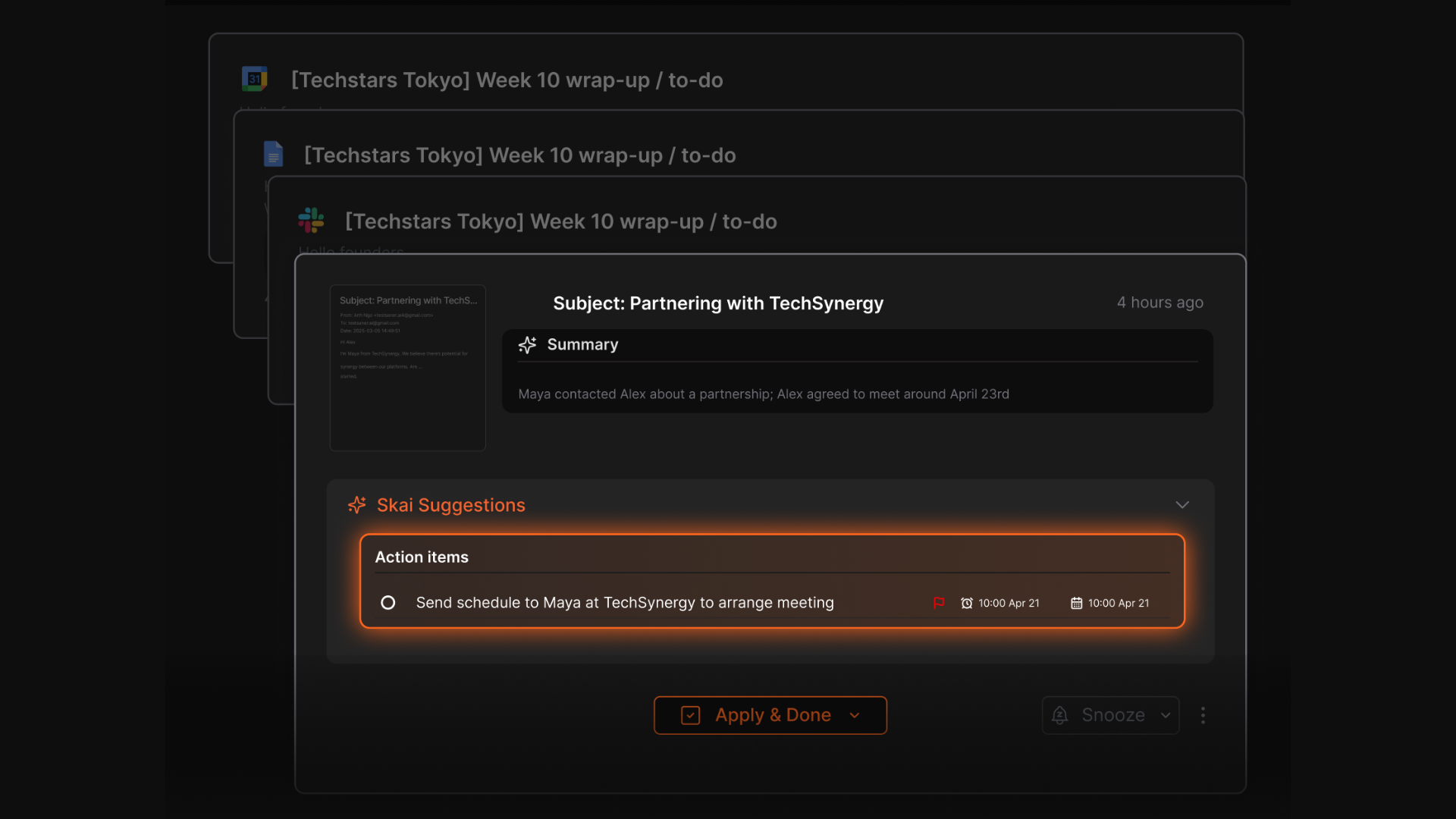
2. Email Triage (9:00 AM)
- Saner.AI flags action items from your emails:
- Urgent: Client approval email (needs reply today)
- Actionable: Invoice to pay (adds to your task list)
- FYI: Internal newsletter (archives automatically)
3. Research & Writing (10:00 AM)
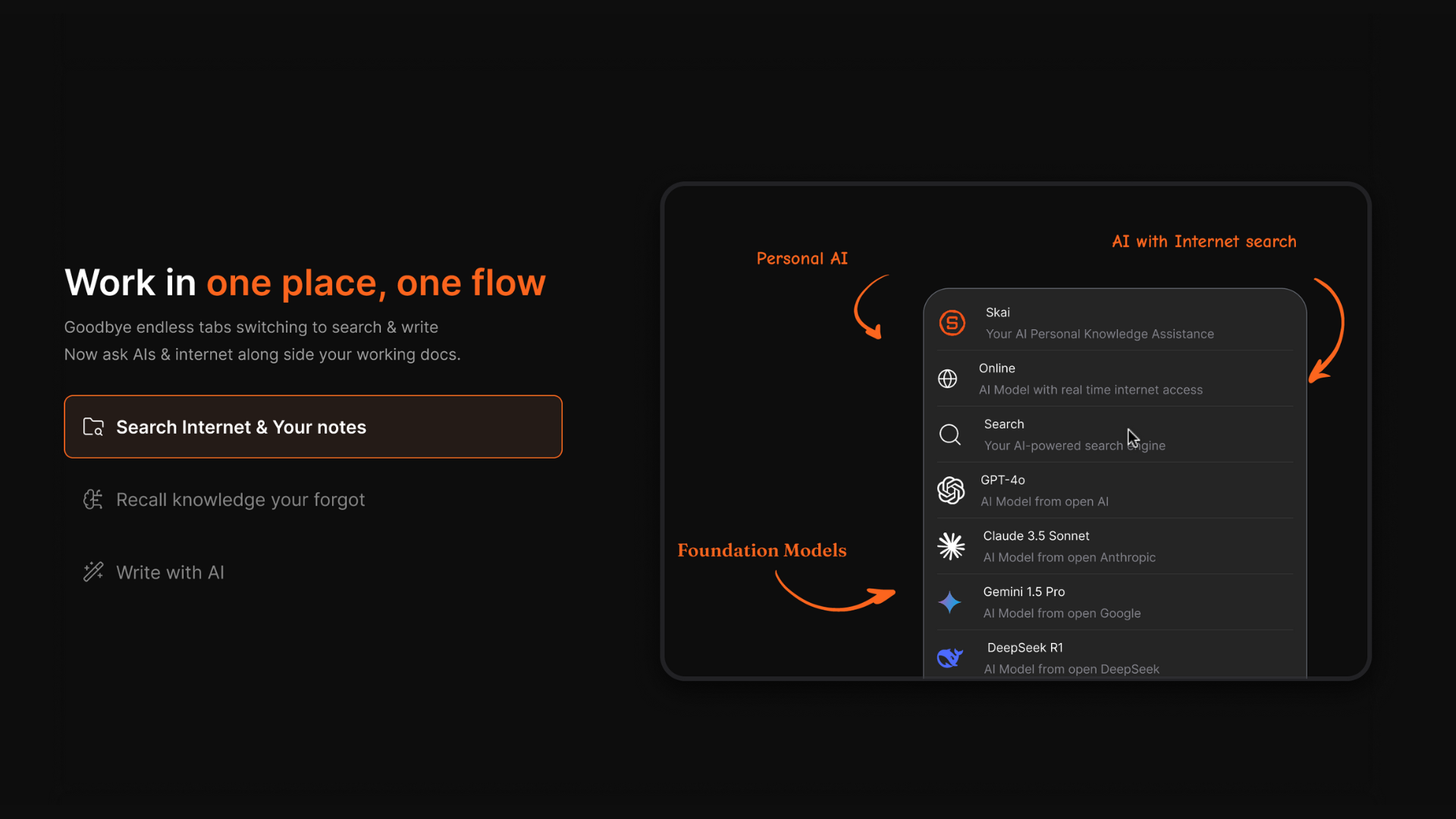
- Use Perplexity to gather the latest stats on your industry in minutes.
- Ask ChatGPT to outline your blog post based on that data.
- Or you can use Saner.AI to search right alongside your notes
Example prompt for Perplexity:
“Summarize the top 3 marketing trends in 2025 with sources.”
Impact: You replace an afternoon of tab-hopping with 25 minutes of focused, AI-assisted research.
4. Scheduling & Meeting Prep (2:00 PM)
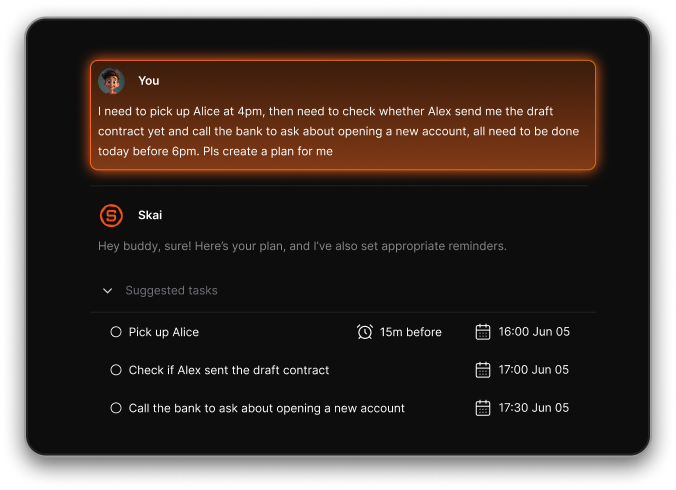
- If you have too many moving parts during the day, just open the mic and talk to Saner.AI. It will turn them into concrete tasks on the calendar for you
- Then Saner.AI sends you:
- The meeting agenda
- Related notes from last quarter’s call
- A reminder to bring up two unresolved issues
Impact: No frantic scrambling to remember context mid-meeting.
5. End-of-Day Recap (5:30 PM)
- AI generates:
- A list of completed tasks
- Follow-ups for tomorrow
- A note to send a thank-you email to a client
Ask Saner.AI:
“Summarize today and prep tomorrow.”
Impact: You close your laptop knowing nothing will slip through overnight.
AI Workflow Tools Comparison Table
| Tool | Main Function | Ideal Use Case | Pricing | Special Features |
|---|---|---|---|---|
| Saner.AI | All-in-one workspace (notes, tasks, calendar, email) | ADHD-friendly daily management | Freemium + Premium | Conversational interface, integrates Gmail, calendar, notes; proactive planning |
| Zapier | App automation | Connect AI tools & apps | Free + Paid | 5,000+ integrations, multi-step workflows |
| Perplexity | AI-powered search & summarization | Research & quick insights | Freemium | Source-backed answers, conversational follow-ups |
| ChatGPT | Writing, brainstorming | Drafting, ideation, editing | Free + Plus | Flexible across creative & analytical tasks |
| Notion AI | Notes, docs, database AI | Team collaboration | Paid tiers | Embedded AI inside structured docs |
| Reclaim.ai | Smart calendar | Auto-scheduling & focus blocks | Paid | Dynamic time adjustments, integrates with Google Calendar |
How to Choose the Right AI Workflow for You
- Identify Your Bottlenecks – Is it email overload, scattered notes, or forgotten deadlines?
- Start With 1–2 Core Tools – Avoid building a monster system you can’t maintain.
- Look for Integration Potential – Tools like Saner.AI and Zapier bridge multiple services.
- Consider Your Budget – Many premium tools have free tiers you can start with.
AI Workflow FAQ – Your Guide to Smarter, Faster Work
1. What is an AI workflow?
An AI workflow is a connected system where artificial intelligence automates, organizes, and streamlines your daily tasks.
Instead of jumping between apps, you create a smooth chain of actions - like gathering info, processing it, and taking action - without manual effort.
Example:
- Perplexity researches a topic for you
- Saner.AI turns the findings into tasks and adds them to your calendar
- Zapier pushes updates to your project management tool
- ChatGPT drafts the client email in seconds
2. What can an AI workflow do for me?
A well-set-up AI workflow acts like an always-on assistant. Common use cases:
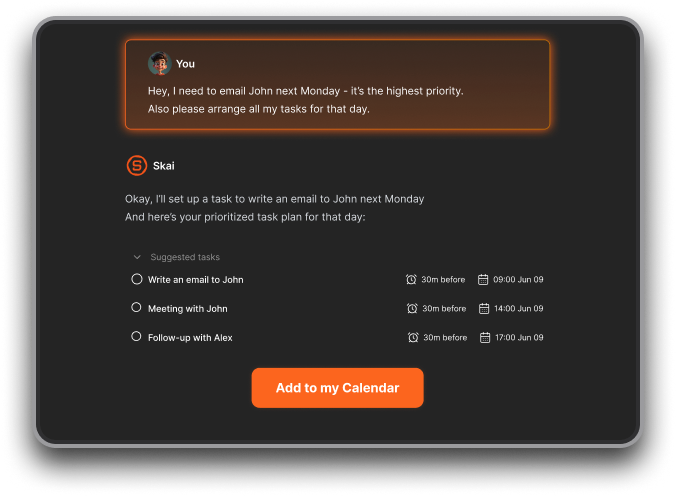
- Task creation from conversation – Turn brain dumps into actionable tasks
- Instant search – Pull up any note, email, or file without digging
- Smart scheduling – Find the best time for meetings or deep work
- Daily planning – Suggest priorities based on workload and deadlines
- Automated follow-ups – Remind you of important conversations
- Research + summarization – Gather and condense large amounts of info
3. Which tools are best for building an AI workflow?
Here’s how top tools fit into the picture:
- Saner.AI – All-in-one workspace for notes, tasks, emails, and calendar. Turns messy info into clear action steps.
- ChatGPT – Great for drafting, brainstorming, and quick problem-solving.
- Zapier – Automates repetitive workflows between different apps.
- Perplexity – AI-powered research with citations for fact-checking.
4. How do I start using an AI workflow?
Start small:
- Pick one problem (e.g., forgetting follow-ups)
- Set up Saner.AI to capture tasks from emails or notes
- Add ChatGPT for quick writing help
- Use Zapier to send those tasks to your calendar automatically
- Expand gradually - don’t overcomplicate it on day one
5. Can AI workflows save time for ADHD users?
Yes - especially.
Tools like Saner.AI reduce context switching and decision fatigue by:
- Organizing notes automatically
- Surfacing the next important task without you searching for it
- Setting reminders without manual tagging
6. How can entrepreneurs use AI workflows?
Entrepreneurs juggle ideas, meetings, and deadlines daily. An AI workflow can:
- Capture investor meeting notes in Saner.AI
- Have Perplexity research market trends
- Let ChatGPT draft your pitch email
- Use Zapier to send tasks to your CRM automatically
7. How do managers benefit from AI workflows?
Managers can:
- Auto-generate follow-up lists after team meetings
- Summarize long update threads with ChatGPT
- See all action items in one Saner.AI dashboard
- Set automated reminders for team check-ins
8. Can AI workflows help with meeting prep?
Absolutely. With Saner.AI, just ask:
- “What did we decide in last quarter’s budget review?”
- “What’s pending from the last product sync?”
It will surface decisions, action items, and deadlines instantly.
9. How is an AI workflow different from traditional productivity tools?
- Traditional tools: You manage them manually.
- AI workflows: They manage themselves and feed you what matters, when it matters.
With Saner.AI + ChatGPT + Zapier + Perplexity, your workflow becomes:
- Hands-off organization
- Fewer tabs and context switches
- More time spent doing, less time setting up

Stay on top of your work with an AI workflow