
Saner.AI - Feb 2025 Update: Mobile, OCR, Multilingual & Task Assistant


Saner.AI Feb 2025 Update
Hello everyone,
We're excited to introduce the Preview Version of Saner.AI 1.0!
For the past few months, we’ve been 1000% laser-focused on making Saner.AI easier to use and more powerful for your productivity. Here are the highlights:
1. The Heart of the Update: A New, Intuitive UX Design
From animations to buttons, we refined every tap, swipe, and interaction to make your experience intuitive, fast, and delightful.
2. Mobile app early access

Mobile app early access: Follow the instructions here to get started:
3. ✨ Task System with AI Assistant:
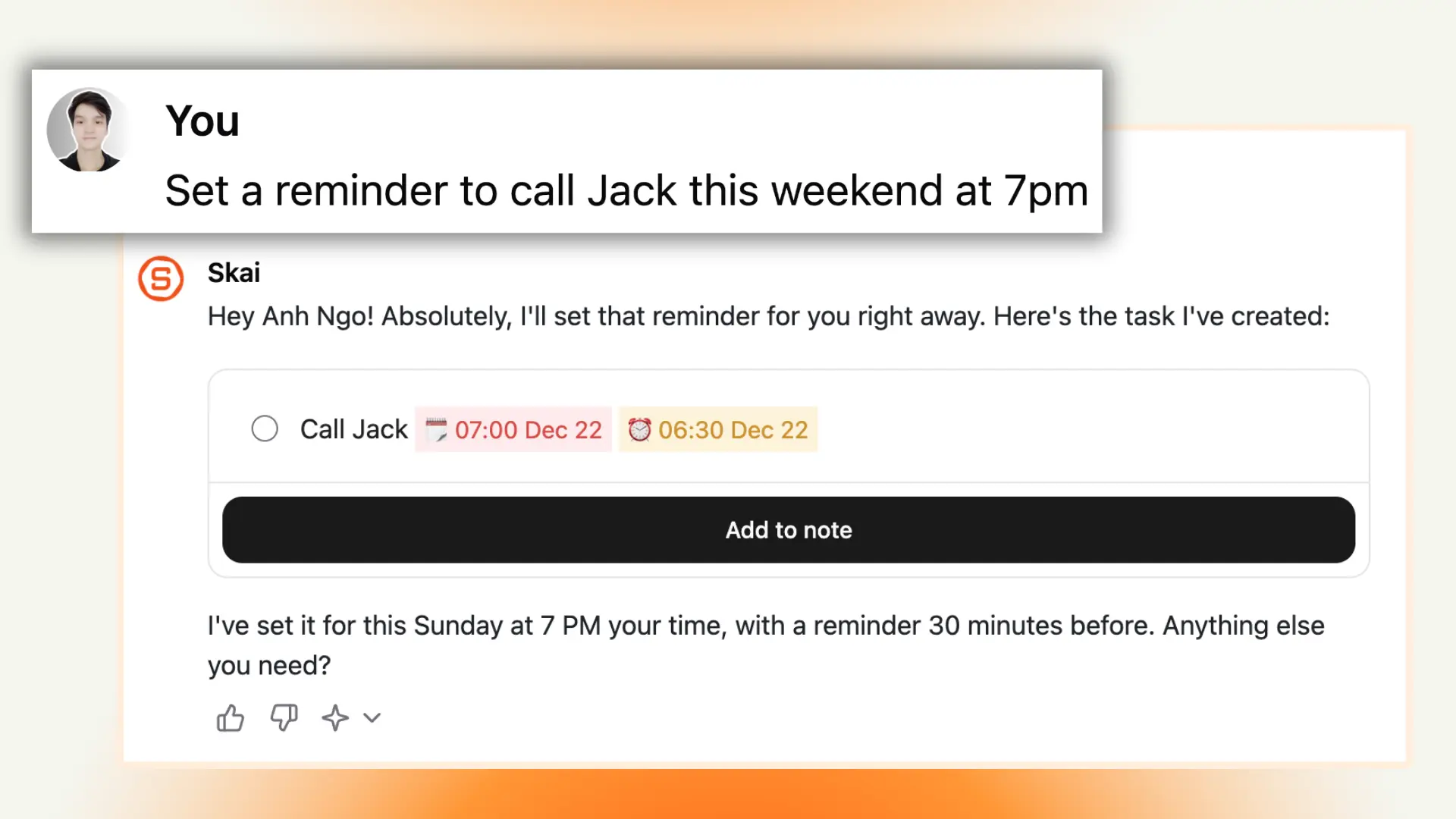
- All tasks from your notes now appear in a dedicated Task section—so you never miss anything again!
- You can ask Skai to create, prioritize, break down tasks, and set reminders tailored to your workflow and schedule.

4. 🌏 Multilingual Support
- Yes, we listened! You can now take notes, search, and interact with Skai in your preferred language
5. 🎯 Focus mode (Picture-in-Picture) for Notes & Tasks:

- Put important notes or tasks in a small floating window, so you always know what to focus on.
6. 📥 Manage all inboxes with Skai
- Skai can now sort, prioritize, and show you what needs attention from your Gmail, Slack, and Calendar inboxes.
7. Performance Improvements:
- Faster, Stronger AI: Faster and more stable AI performance
- Smarter Imports: You can import thousands of files with detailed success reports and clear error feedback.
- Convert image to text (OCR): Input a photo & Skai can convert it to text so you can find it anytime using AI
- Advanced Search: 200% faster search, including PDFs, connectors, and multilingual support.
- Safer Connections: Every connector has been security-audited
- Enhanced Editor: Write, edit, drag-drop, and organize faster
- Dark Mode Fixes: A flawless dark mode experience.
The Next thing will be Big!
- Cutting-edge AI Assistant: Skai with advanced reasoning, functioning, and retrieval capabilities
- Native Mobile Apps: An official iOS and Android app
This release is our promise to you - crafted with care and powered by passion 🙂
The best is yet to come. We would love to hear your feedback; just reply to this email or email us at contact@saner.ai
Warmly,
The Saner.AI team
Read more
Motion vs. Saner.AI for ADHD: Which AI planner is better?
Quick answer:
* Motion is an AI calendar. You give it tasks; it auto-schedules them into open time on your calendar, and it reshuffles everything when your day changes.
* Saner.AI is an AI assistant built for ADHD. It pulls your notes, email, Slack, and calendar into one place, drafts your day each morning, and reminds you of stuff you forgot.
Pick Motion if your problem is when to do the work. Pick Saner.AI if your problem is remembering the work exists.
* Motion: $29/month billed yearly
Sunsama vs Saner.AI for ADHD: Which one should you pick?
The quick answer
* Sunsama is a guided daily planner. Every morning, it walks you through picking tasks, estimating them, and putting them on your calendar
* Saner.ai is an AI assistant that keeps your notes, email, tasks, and calendar in one place, drafts your day for you, and nudges you about what you forgot.
If you'll reliably show up for a 15-minute ritual, Sunsama is excellent. If your mornings are chaos and your real problem is stuff falling out of your head, Saner.ai fits bette
How To Build a Second Brain For ADHD
The short answer
A second brain for ADHD is an outside system that holds what your working memory drops: ideas, tasks, links, "don't forget" moments. The version that works for ADHD has one capture point, very little filing, and search or AI that finds things for you, so it keeps working through the weeks you fall behind.
If you've ever built a gorgeous Notion setup on a Sunday and abandoned it by Wednesday, this post is for you. I'm going to skip the productivity-guru perfection and focus on

ADHD Object Permanence: How To Deal With It?
You bought spinach on Sunday. You found it on Friday, at the back of the fridge, turned into something closer to soup. You didn't forget spinach exists. You just stopped thinking about it the second you closed the fridge door.
The same thing happens with the email in your drafts folder, the library book under the passenger seat, and the friend you really do love but haven't texted in four months. If you have ADHD, there's a good chance you've heard someone online call this "object permanence."