
Saner.AI - 30 June Update: Smarter AI, Voice features, Chat with specific notes, and More!


Saner.AI Biggest Update since Launch!
Hello everyone,
We're excited to announce the stable release of Saner.AI!
Here are the powerful features, requested by users like you, that help you easily extract insights and work with your knowledge base, all while keeping the app simple to use.
1. 🏆 Advanced Skai's Retrieval and Reasoning

- Instantly Learn: Skai is now up-to-date with your notes in real-time—milliseconds after saving!
- Never Miss a Note: No more "I don't have any notes" bug! The system will refresh and relearn your notes every 5 minutes to ensure nothing slips through the cracks.
- Advanced Intelligence: Skai has been upgraded with most advanced retrieval and reasoning abilities to serve you better.
2. 📝 AI Personalized Task and Reminder Assistant
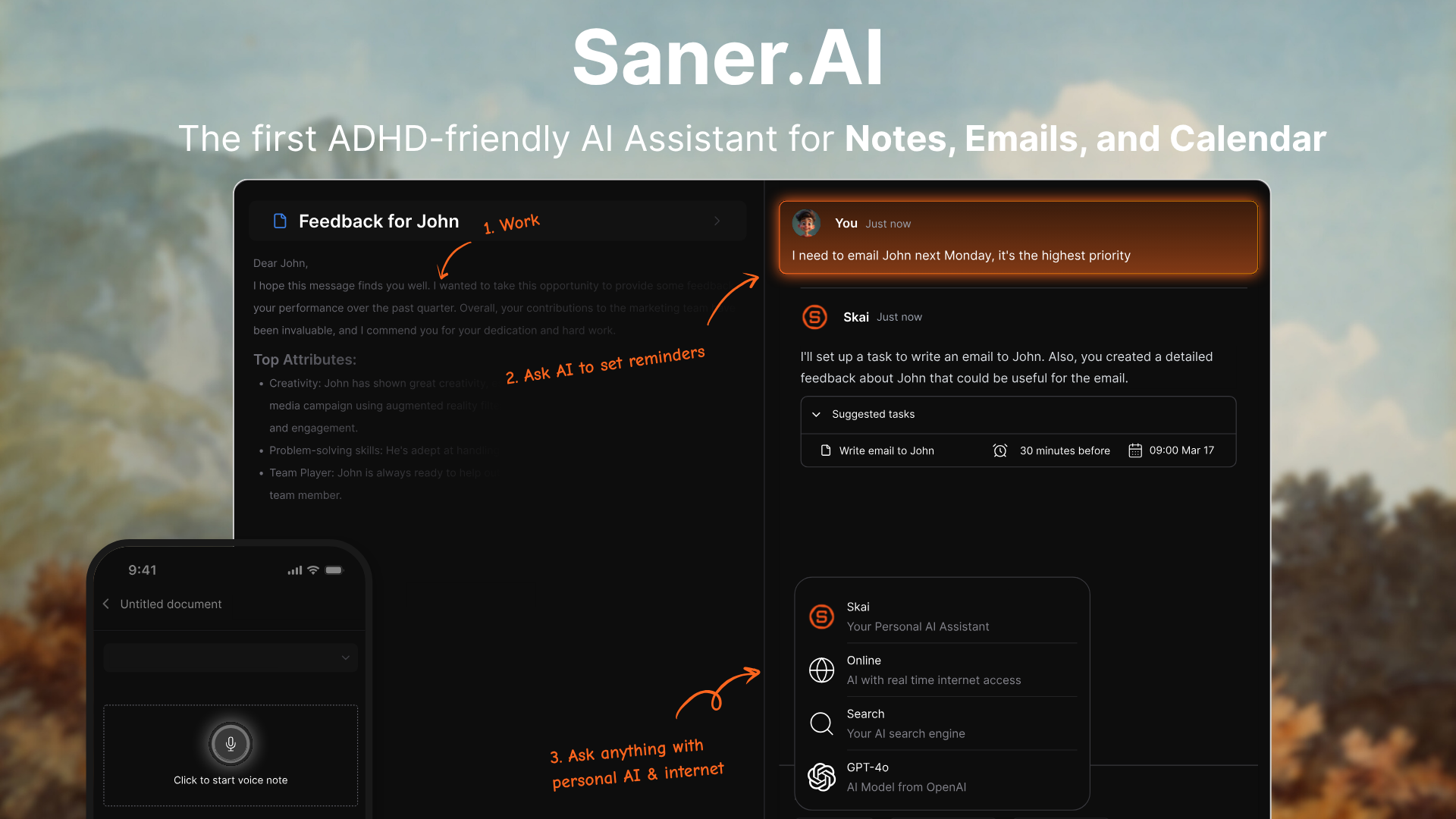
- To-Do Lists and Reminders: Easily create tasks with due date or reminder directly in each note or by chat with Skai, who will then send personalized reminders to you!
- Task Partner: Overwhelmed or don’t know where to start with a task? Ask Skai to breakdown, plan or guide you through the tasks
3. ✨ New Timeline View
- Timeline view: With this view, you can see your notes by day, week, or month, enhancing your ability to track and manage information over time.
4. 🗣️ Voice & Recording Note Features
- Voice Support: You can now send voice messages through chat or upload recordings directly into your notes.
5. 📬 Refined Inbox
- Refined UI: Experience our new inbox UI, making it easier to view, and filter your tasks and notes.
6. 🌒 Dark Mode
- Yes, Dark Mode: We heard you :) you can now enable Dark Mode or system sync in your settings.
7. ✅ Ask AI about specific notes/folders
https://res.cloudinary.com/dhq9xe2ha/video/upload/v1719820745/Ask_AI_on_notes_aublow.mp4
- Specific References: Get more accurate answers by specifying which folders or notes Skai should reference.
8. 📂 Easier folders and tags
https://res.cloudinary.com/dhq9xe2ha/video/upload/v1719820748/Bulk_Note_klbfhg.mp4
- Drag & Drop: Easily organize your workspace by dragging and dropping folders directly from your sidebar.
- Bulk Actions: Select multiple notes or folders for bulk actions like moving or deleting.
9. 🚀 General Improvements
- Lightning Note Importing: Import thousands of notes from multiple sources like Apple Notes, Evernote, Notion, Obsidian, or files in seconds!
- Smarter Searches: Keyword and semantic searches have been refined to return smarter, highlighted results.
- Improved Telegram Bot: The Telegram bot is now 2x faster and supports voice notes and task creation on the go.
- Core Actions: Fundamental actions like creating new chats or notes are now significantly faster.
- Enhanced Tags: Tag suggestions are now smarter and more relevant to your existing notes.
- Bugs fixed: We have fixed almost all of the small bugs and received feedback from folks like you!
Thank you all for your testing and feedback 🙏 Saner.ai is becoming more stable, and we’re excited to help you confidently manage your information and to-dos with ease.
We are committed to continually improving the app, so please keep the feedback coming!
Warm Regards,
Saner.AI team
Stay on top of your work and life effortlessly
Read more
Reclaim.ai vs Saner.ai for ADHD: Which AI Calendar Fits Your Brain?
The key answer
Reclaim.ai and Saner.ai both use AI to help adults with ADHD, but they fix different problems
* Reclaim guards your calendar: it auto-schedules focus time, habits, and tasks around your meetings.
* Saner handles the mess before the calendar: it turns brain dumps, emails, and notes into tasks, then tells you what to work on each morning.
Pick the one that matches where your day actually breaks.
* Pick Reclaim.ai if your calendar is stuffed with meetings and the work you mean
Motion vs. Saner.AI for ADHD: Which AI planner is better?
Quick answer:
* Motion is an AI calendar. You give it tasks; it auto-schedules them into open time on your calendar, and it reshuffles everything when your day changes.
* Saner.AI is an AI assistant built for ADHD. It pulls your notes, email, Slack, and calendar into one place, drafts your day each morning, and reminds you of stuff you forgot.
Pick Motion if your problem is when to do the work. Pick Saner.AI if your problem is remembering the work exists.
* Motion: $29/month billed yearly
Sunsama vs Saner.AI for ADHD: Which one should you pick?
The quick answer
* Sunsama is a guided daily planner. Every morning, it walks you through picking tasks, estimating them, and putting them on your calendar
* Saner.ai is an AI assistant that keeps your notes, email, tasks, and calendar in one place, drafts your day for you, and nudges you about what you forgot.
If you'll reliably show up for a 15-minute ritual, Sunsama is excellent. If your mornings are chaos and your real problem is stuff falling out of your head, Saner.ai fits bette

How To Build a Second Brain For ADHD
The short answer
A second brain for ADHD is an outside system that holds what your working memory drops: ideas, tasks, links, "don't forget" moments. The version that works for ADHD has one capture point, very little filing, and search or AI that finds things for you, so it keeps working through the weeks you fall behind.
If you've ever built a gorgeous Notion setup on a Sunday and abandoned it by Wednesday, this post is for you. I'm going to skip the productivity-guru perfection and focus on