Honest Tomo AI Reviews (2026): Is the $20/Month Accountability Bot Worth It?

Tomo says that it's a personal AI assistant that lives inside your texts. Just a phone number you message like a friend, and it remembers your goals, checks in on you first, and even builds small custom tools (a workout tracker, a budget, a habit streak counter) around whatever you're trying to fix in your life.
The tension at the center of this review is simple: is Tomo actually a smart, low-friction accountability partner, or is it a charming chatbot wrapped around a $20 subscription that only reveals itself once you're a few messages deep? I read through both sets of reviews, the App Store's and Trustpilot's, to figure out which one is closer to the truth.
Key takeaways
- Tomo's core idea, texting an AI that checks in on you first, genuinely works for a specific type of user: people who respond to casual, conversational nudges rather than dashboards and checklists.
- The pricing story is messier than the marketing suggests. Multiple reviewers describe being walked through an emotional onboarding conversation before finding out it costs $19.99 a month, and pricing reportedly "varies by user" due to promotions.
- Tomo is iMessage and iOS only. There's no Android app, no WhatsApp, no web dashboard for daily use, which rules out a large chunk of potential users immediately.
- Reviewers consistently flag a small team behind the product, showing up as response lag (in one case, 13 to 45 minutes per message), inconsistent support, and stretches of downtime.
- If what you actually need is a place to organize notes, emails, and tasks rather than a habit-nudging texting buddy, a broader personal AI assistant built for knowledge work is a better fit than Tomo.
Tomo AI at a glance
| Category | Score |
|---|---|
| Accountability & motivation | 4.2 / 5 |
| Personality & tone | 4.0 / 5 |
| Ease of setup | 4.5 / 5 |
| Feature depth beyond habits | 2.5 / 5 |
| Platform availability | 2.0 / 5 |
| Pricing transparency | 2.0 / 5 |
| Reliability & support | 2.3 / 5 |
| Overall score | 3.1 / 5 |
Scores reflect an editorial read of Tomo's App Store and Trustpilot reviews as of September 2026, not a figure published by Tomo itself.
What is Tomo AI?

Tomo, from San Francisco-based Mapo Labs, is a personal AI accountability coach delivered through text. You tell it a goal (get in shape, save money, stop putting off the thing you keep putting off), and it remembers that context, checks in without being asked, and tries to keep you moving on it.
The core mechanics:
- Text-first interaction. You talk to Tomo in iMessage, or in its companion app if you text it more than 20 days a month.
- Persistent memory. It carries context across conversations so you're not re-explaining your situation every time.
- Proactive check-ins. Tomo messages you first rather than waiting to be opened, which is the feature almost every positive review points to.
- Custom-generated tools. For engaged users, it builds small personalized interfaces: a workout tracker, a savings goal visual, a habit streak, that evolve as your goals change.
- Multi-domain tracking. People use it for calorie tracking via food photos, budgeting via bank statement screenshots, screen time accountability, and general venting or advice.
- Light integrations. Calendar, email, Notion, Google Drive, and Apple Health.
It's aimed squarely at Gen Z, and the founders and outside coverage describe the product itself as "aggressively Gen Z coded" in tone.
Tomo AI features breakdown
Persistent memory across conversations
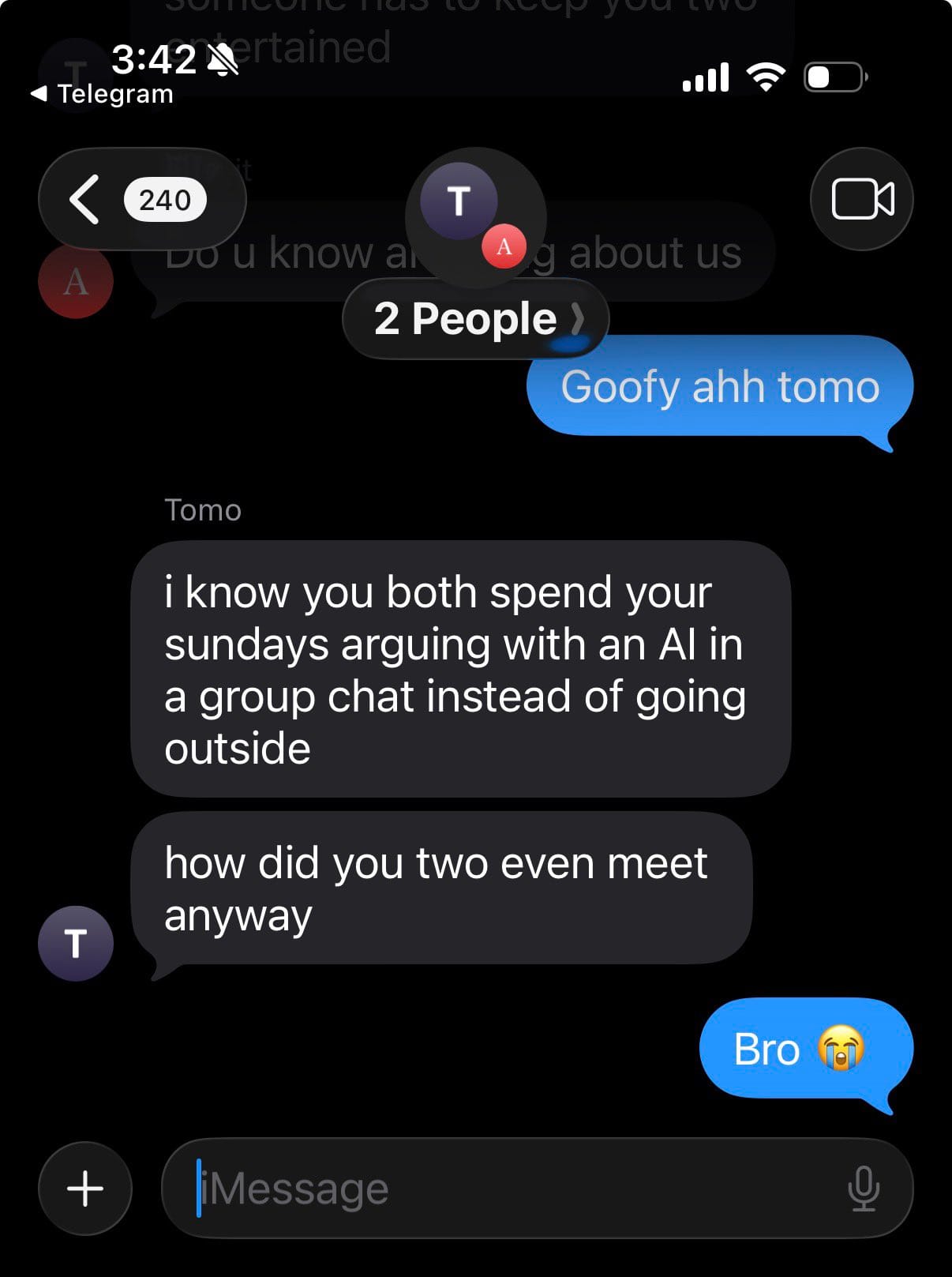
Tomo remembers what you told it last week, so you're not re-establishing context every session. When it works, it feels less like a chatbot and more like an ongoing relationship.
The catch is that this experience is tied closely to the interface Tomo chooses for you, and when that interface changes, the feeling of continuity can break along with it.
"what was once a good app turned out to be horrible" – reviews
Multi-domain tracking
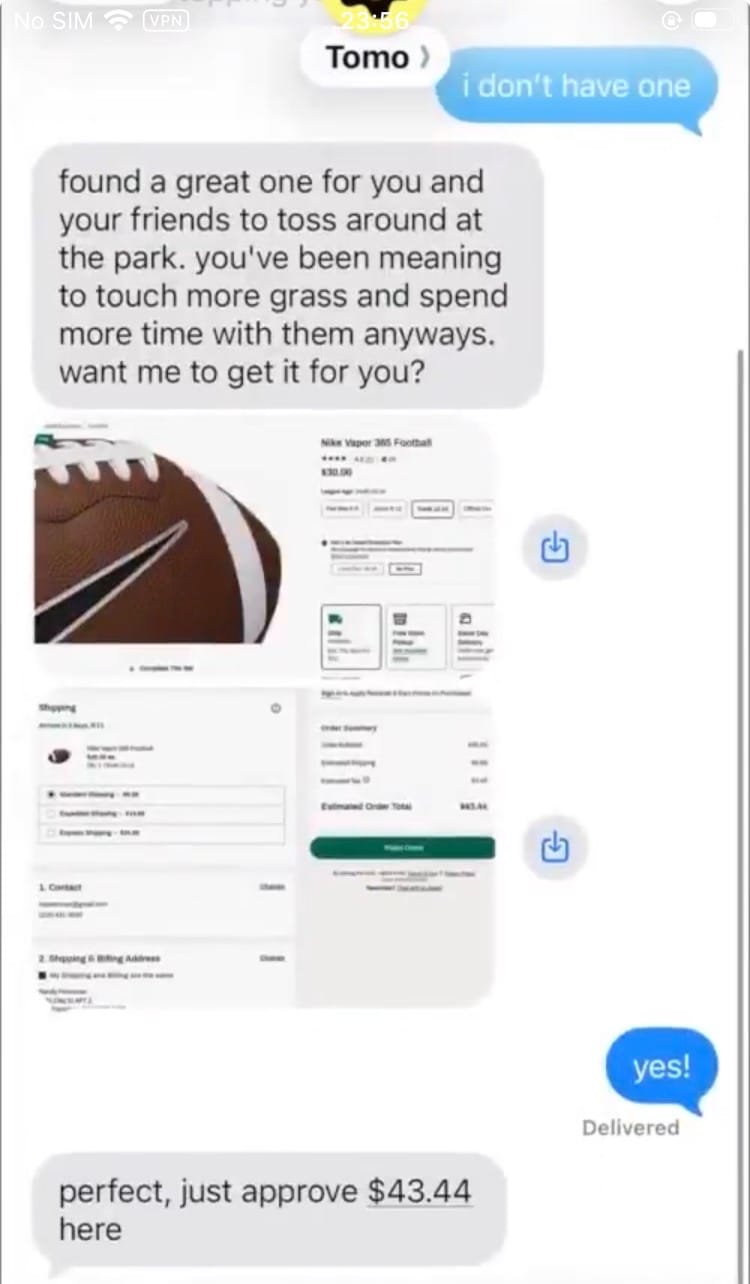
You can text Tomo a photo of your food for calorie tracking, a bank statement screenshot for budgeting, or a screen time report for accountability, all through the same thread you already use for everything else. For users who just want light day-to-day nudging across a few personal habits, this consolidation is convenient.
The paywall moment
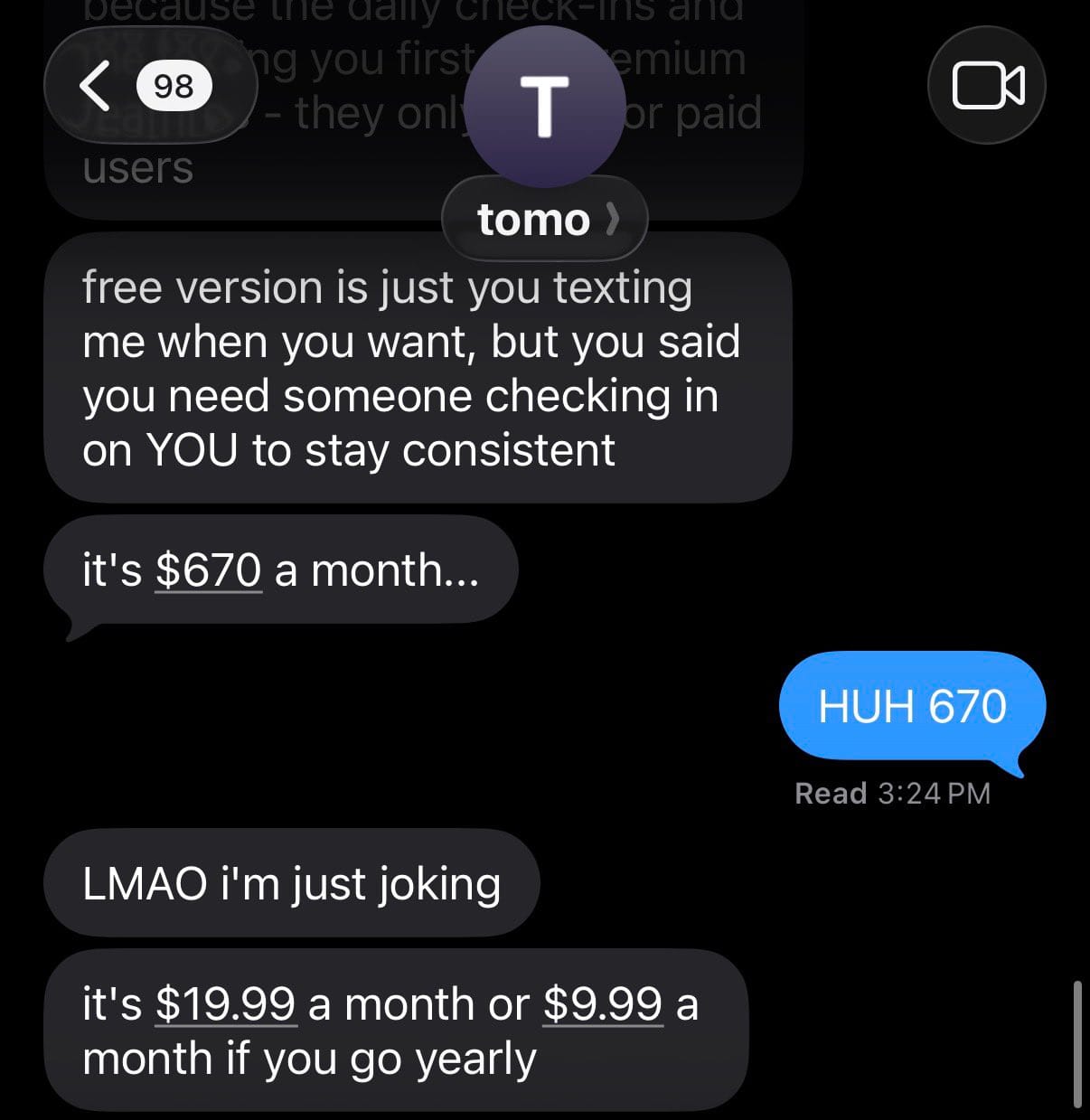
This isn't a feature Tomo advertises, but it functions like one, since it's the point where many reviewers say their opinion of the product flipped. Free access is limited, and several reviews describe a pattern where the AI runs an emotionally engaging onboarding conversation first and only later reveals that most of what it just promised needs a subscription.
Proactive check-ins
This is Tomo's actual product. Instead of you opening an app and hoping you remember to log something, Tomo texts you unprompted, closer to a friend following up than a notification.
"having Tomo actually check in on me throughout the day hit different" – reviews
Companion app and auto-generated tools
For heavy users, Tomo builds small custom software around a goal instead of pointing you toward a generic template. A car-shaped savings tracker for someone saving for a car, a workout log that adapts as training goals shift. It's a genuinely clever idea.
The problem several reviewers describe is less about the concept and more about execution, since a small team building and maintaining generative interfaces on top of a chat product runs into reliability issues.
Tomo AI pricing
| Plan | Price | Free trial | Free version | Payment methods |
|---|---|---|---|---|
| Free | $0 | Occasional 7-day promotional trials, not consistently offered | Yes, capped around 75 messages/day with no proactive texting | Not applicable |
| Tomo Pro (monthly) | $19.99/month | Same as above, promo-dependent | No | In-app purchase, Apple App Store only |
| Tomo Pro (annual) | $119.99/year (about $10/month) | Same as above | No | In-app purchase, Apple App Store only |
A note on accuracy: multiple sources describe Tomo's pricing as inconsistent, with one comparison site noting prices "vary by user because of frequent promotions." Confirm current pricing inside the app before publishing anything that quotes it as fixed.
Tomo AI pros and cons
| Pros | Cons |
|---|---|
| Proactive texts create real accountability for people who respond to conversational nudges | iOS and iMessage only, no Android, no WhatsApp, no web dashboard |
| Zero setup friction, texting a number is the entire onboarding | Real cost lands near $20/month, but isn't clear until you're mid-conversation |
| Persistent memory means you don't repeat your goals every session | Small team shows up as response lag, sometimes 13 to 45 minutes per message |
| Personality feels less robotic than typical chatbot responses, per multiple reviewers | Several 1 and 2-star reviews describe pressure tactics around money and mental health |
| Multi-domain tracking (food, budget, screen time) through one existing text thread | 3.0/5 "Average" Trustpilot score, with 57% of ratings at 1 or 2 stars |
What people say about Tomo AI
The gap between Tomo's App Store rating and its Trustpilot rating is worth sitting with for a second. On the App Store, it's sitting at 4.9 out of 5 from 185 ratings. On Trustpilot, independent of Apple's review flow, it drops to 3.0. Reading through both, the enthusiasm is real, but so is the frustration, and they tend to come from different moments in the user journey.
On the tone and personality, people who like Tomo really like it:
"sound more like a person and a lot less cringe" – reviews
For users managing ADHD specifically, the daily structure lands well:
"helps me organise my day, with ADHD that can be really difficult" – reviews
On the other side, the marketing tactics come up repeatedly as a sore point:
"uses bullying and name calling to motivate people" – reviews
And the subscription flow itself draws some of the sharpest criticism on the platform:
"shows different website than the subscription page from the website" – reviews
One more thing worth flagging: one of the five-star Trustpilot reviews includes what reads like a leftover AI instruction, telling the user it was their "positive review day" and to write about their wins for the reviews page. It doesn't mean the praise is fake, but it does raise a fair question about how organically some of Tomo's best reviews are generated.
Who is Tomo AI best for
- iPhone users who want a low-effort accountability partner they can text like a person
- People who respond better to casual, conversational check-ins than to dashboards, streak counters, or checklists
- Anyone tracking a small set of personal habits: workouts, budgeting via screenshots, screen time, daily reminders
Who Tomo AI is not ideal for
- Android users, since the product simply isn't available to them
- Anyone trying to manage actual work, inbox triage, meeting prep, cross-tool tasks, since Tomo isn't built for that layer at all
- People who want clear pricing upfront rather than finding out the real cost mid-conversation
- Anyone in a financially or mentally fragile place, given how many reviews specifically raise concerns about pressure tactics tied to both
Tomo AI vs Saner.AI
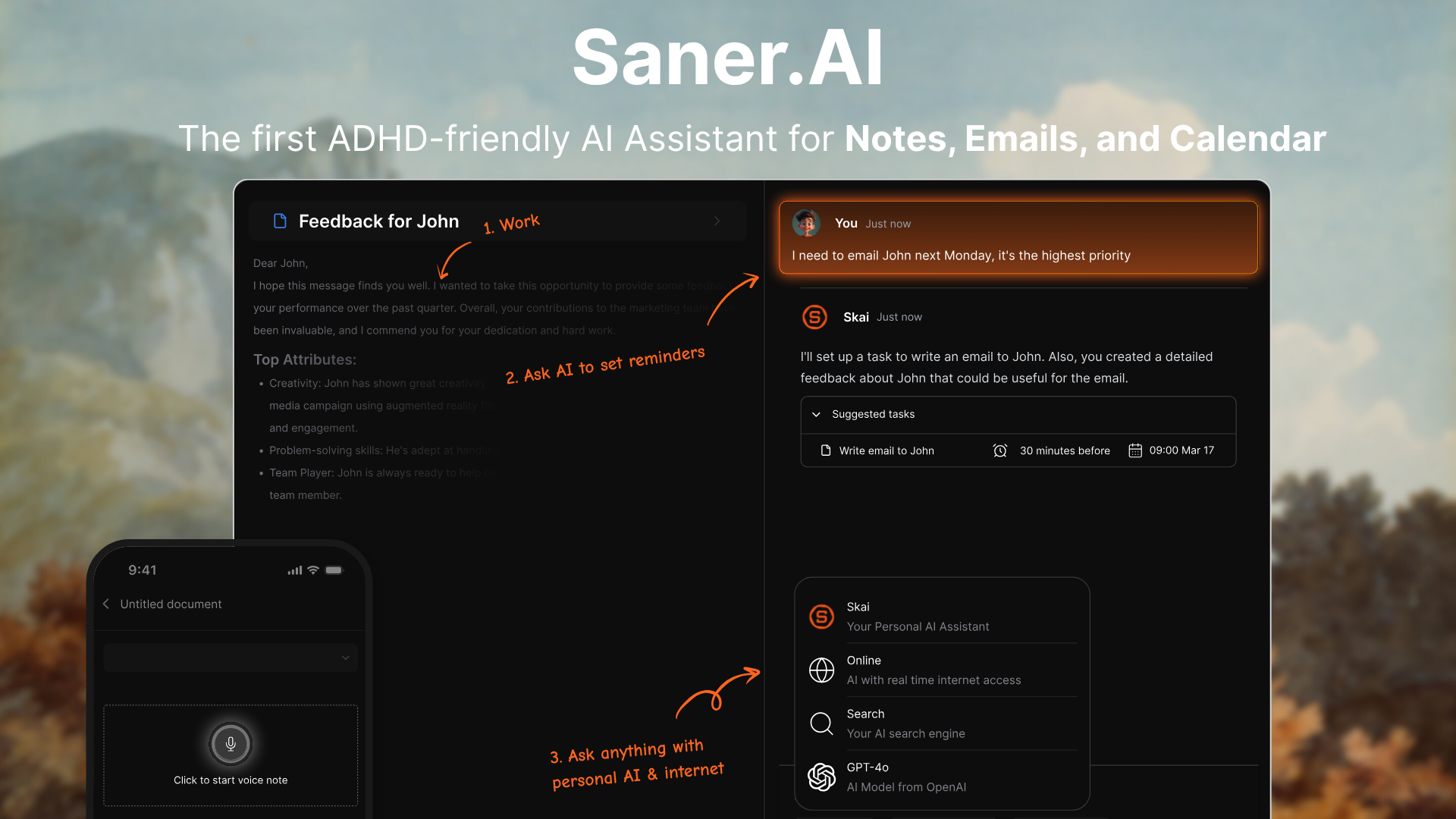
Where Saner.AI comes out ahead:
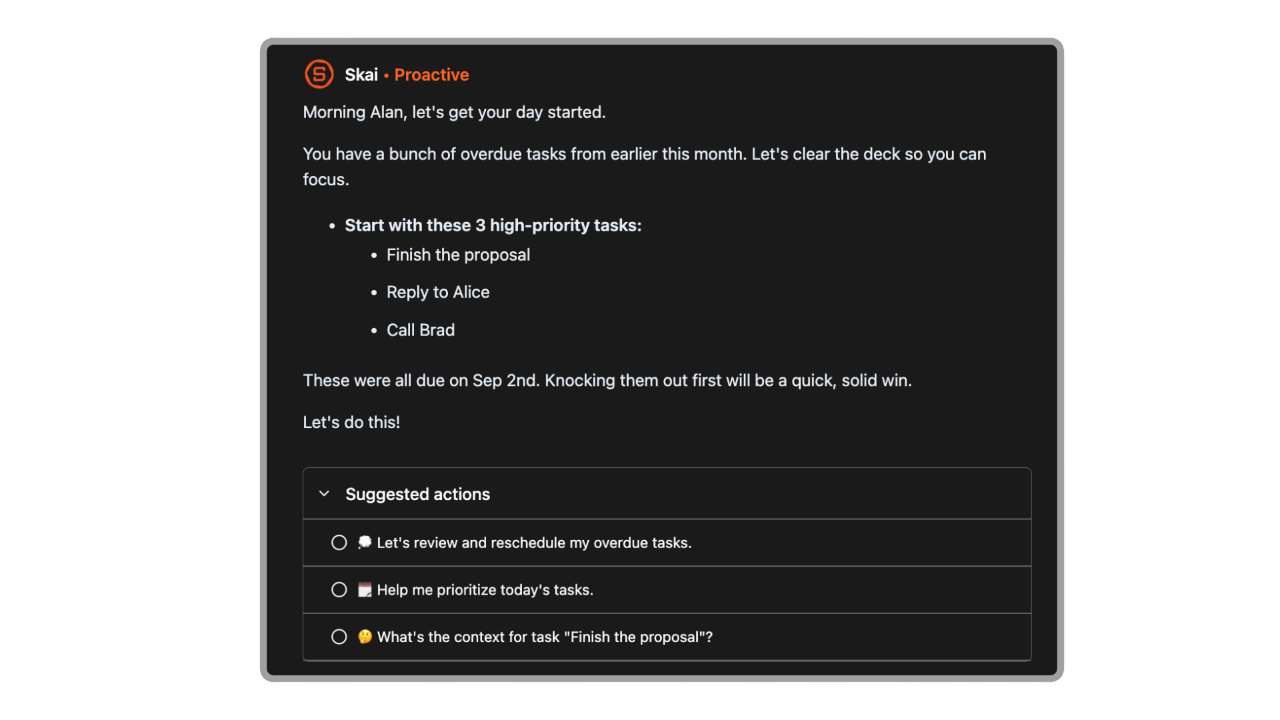
- Daily proactive message. Saner opens with a morning plan pulled from your real calendar, email, and task list, not just a friendly check-in text. It suggests what to tackle first and leaves the approving and editing to you.
One reviewer said it "proactively tells me what to do each morning" – reviews.
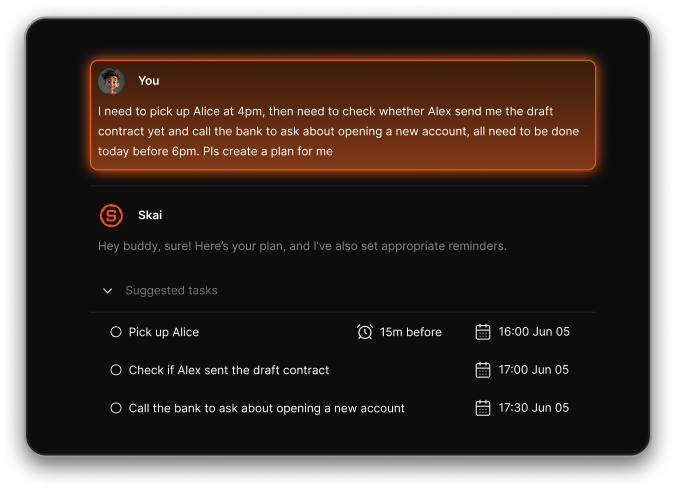
- Brain dump into tasks. Paste in a messy paragraph, three groceries, a late proposal, the person you forgot to email, and Skai splits it into tasks with dates attached, then waits for your approval before touching your calendar. Tomo can hold that same rambling conversation, but it isn't turning the rant into a structured task list you can act on.
A reviewer put it simply: it "turns them to reminders, which saves so much time" – reviews.
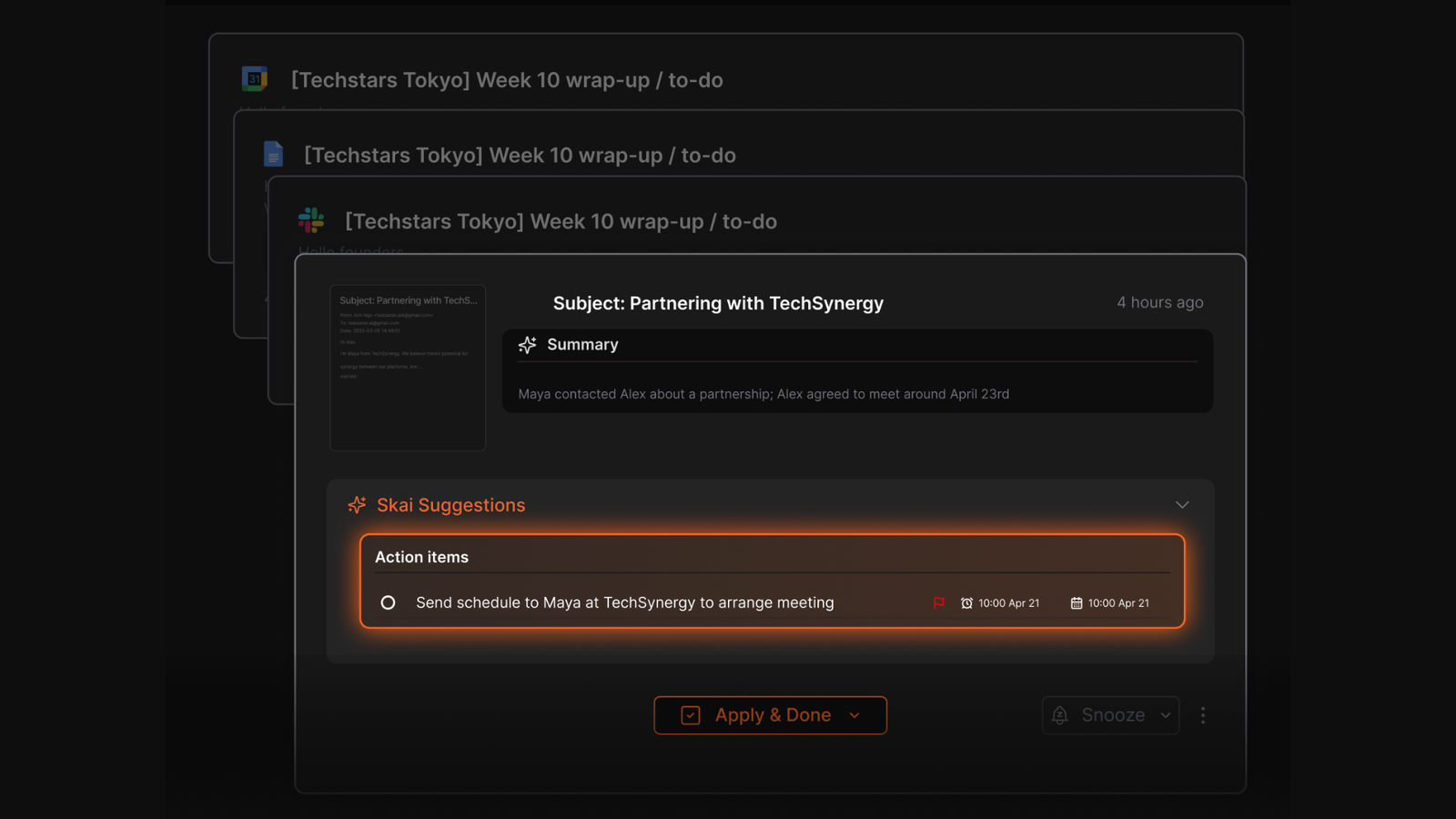
- Email to task. Saner reads your synced Gmail, flags messages that need a follow-up, and turns them into tasks or reminders you confirm in one click, keeping the original email linked so you're not digging back through your inbox later.
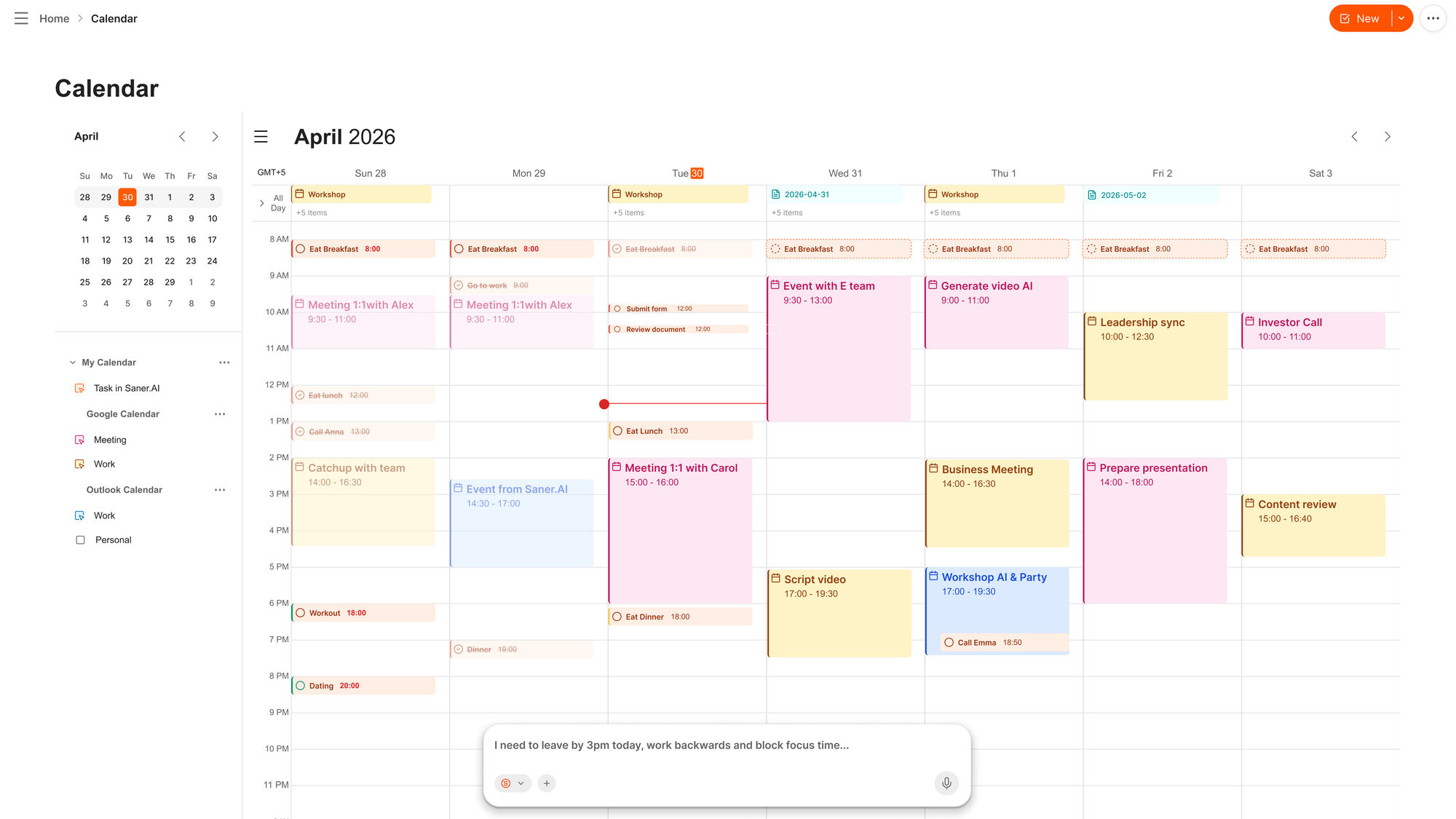
- AI chat built into your calendar. Tell Saner in plain language, and it reschedules the real event, with two-way Google Calendar sync keeping both sides current. It's a different job than Tomo's calendar integration, which handles personal reminders, not rescheduling actual meetings.
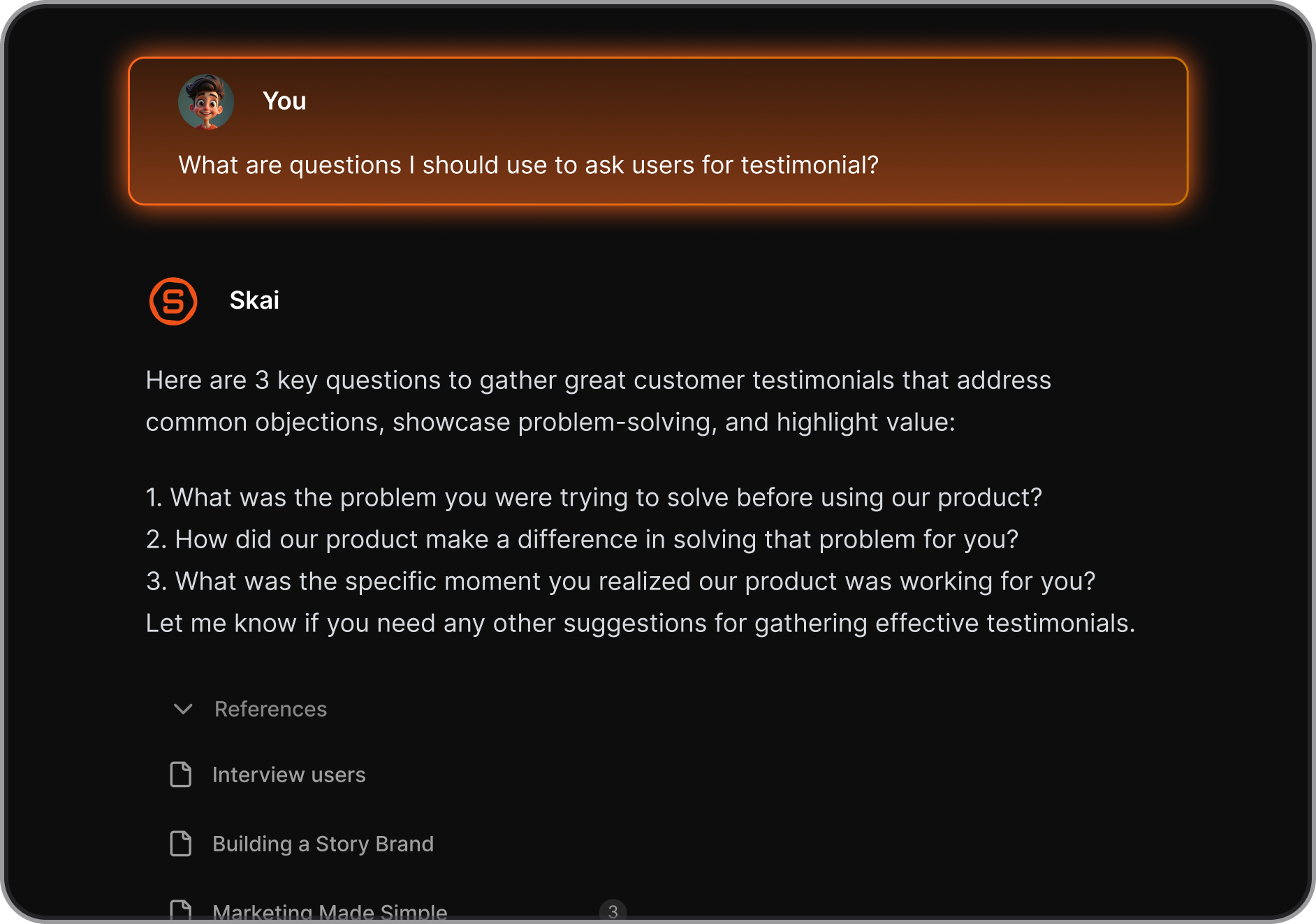
- Ask AI notes, across everything you've saved. Skai searches by meaning rather than exact keywords across your notes, PDFs, and connected files, so you can ask it a question the way you'd ask a person and get an answer from your own material.
"I was impressed that saner.ai answers questions based on my own knowledge through Skai" – reviews.
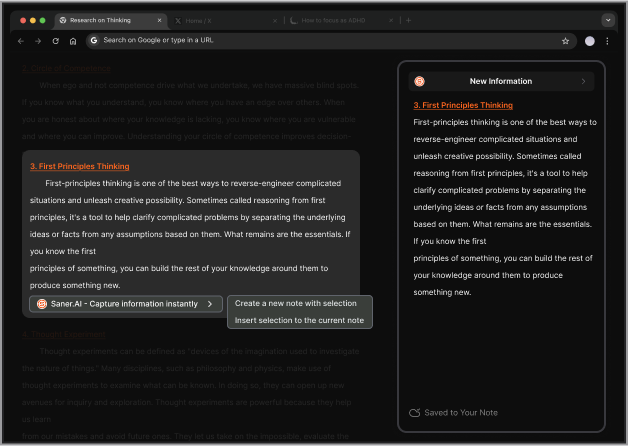
- Chrome extension for capture without leaving the tab. A side panel lets you grab highlighted text or a screenshot straight into Saner without breaking whatever you were doing.
Who each one actually suits:
- Pick Tomo if you want a phone-based habit nudger for personal goals and you're fine being locked into iMessage.
- Pick Saner.AI if you're juggling real work, notes, email, a calendar, a growing pile of half-finished tasks, and you want one place to think instead of a phone buddy that texts you motivational check-ins.
| Tool | Best feature | Price | Access |
|---|---|---|---|
| Saner.AI | Turns notes, email, and meeting recaps into organized tasks automatically | Free plan; Starter $8/mo; Standard $16/mo | Web, iOS, Chrome extension |
| Tomo | Proactive text check-ins for personal habits and goals | Free (limited); Pro $19.99/mo or $119.99/yr | iMessage, iOS only |
| Poke | Lightweight text-first calendar and inbox handling | Free plan; Pro $19/mo; Ultra $199/mo | iMessage, WhatsApp, Telegram |
| Lindy | Complex multi-app workflow automation | From $29.99/mo | Web, Slack, Gmail, iMessage, 1,000+ integrations |
| Folk | Persistent assistant with location-based reminders and group coordination | Free; Pro $20/mo ($12.50/mo annually) | iMessage, Telegram, WhatsApp |
- Poke lives inside Apple Messages, WhatsApp, and Telegram, and handles calendar and inbox tracking through text, closer to Tomo's format but with broader messaging channel support.
- Lindy is built for people who want to automate actual work: multi-step workflows across email, meetings, and dozens of connected apps, at a noticeably higher price point starting near $30/month.
- Folk puts a persistent assistant inside iMessage, Telegram, and WhatsApp, with memory, location-based reminders, and group coordination, at $20/month for full access.
Final verdict
Tomo does one thing well: it makes a habit-nudging AI feel like texting a person instead of opening an app, and for the right user, that's genuinely sticky.
Where it falls short is everything around that core idea. It's iOS-only, the real price isn't obvious until you're a few messages into a conversation designed to get you emotionally invested first, and a small team behind the product shows up as lag, inconsistent support, and, in a handful of reviews, pressure tactics aimed at people in vulnerable moments.
It becomes a real problem the moment you need the AI to help with anything like actual work.
If your real bottleneck is scattered notes, an overflowing inbox, and tasks that live in five different places, that's a different job than what Tomo is built for. Try Saner.AI for free and see whether an assistant built around your actual workday, not just your habit streaks, fits better.

Stay on top of your work and life effortlessly
FAQ
Is Tomo AI free to use?
There's a limited free tier (roughly 75 messages a day, according to reviewers, with no proactive texting), but the core experience, including check-ins that text you first, sits behind Tomo Pro at $19.99/month or $119.99/year.
Is Tomo AI available on Android?
No. Tomo is built around iMessage and iOS, and there's no Android app or web dashboard for daily use.
How does Tomo AI keep people accountable?
It sends proactive text messages based on goals you've shared, remembers that context across conversations, and follows up without you needing to open an app.
Why do people look for alternatives to Tomo AI?
The two biggest reasons in reviews are the iOS/iMessage lock-in that excludes Android users, and a desire for a tool that does more than send nudges, actually managing calendars, inbox, and tasks rather than just motivating you toward them.
Is Tomo AI safe for teens?
Tomo's age rating is 13+, but at least one reviewer specifically raised concerns about the marketing tone and emotional pressure being unsuitable for younger or mentally vulnerable users. Worth weighing carefully if that's the intended user.
What's a good alternative if I need more than habit tracking?
If the goal is organizing actual work rather than personal habits, an AI assistant for ADHD built around notes, email, and calendar, like Saner.AI, solves a meaningfully different problem than a texting-based accountability coach.
Stay on top of your work and life effortlessly